
No Creative Menu
Java mod listed for Minecraft 26.x. Downloads from the MC Java Mods app on Android.
A lightweight client-side mod that optimizes performance by allowing you to hide the vanilla creative inventory.
⬇ Download on Modrinth
❌ NoCreativeMenu
NoCreativeMenu is a lightweight, high-performance client-side utility for Minecraft that allows you to disable the vanilla creative inventory. Perfect for those who rely on external item browsers like JEI, REI, or EMI. For both Fabric and Neoforge
🚀 Why NoCreativeMenu?
In large modpacks, the vanilla creative menu becomes a source of performance overhead. To display thousands of items, Minecraft must populate dozens of tabs and build complex search trees every time you open the screen, leading to noticeable "lag spikes".
If you are already using JEI, REI, or EMI, the vanilla creative inventory is redundant. NoCreativeMenu stops that unnecessary rendering, saving CPU and RAM cycles for what truly matters: your gameplay.
✨ Features
- Toggle on the Fly: A clean button integrated into your inventory to switch between the full creative screen and the optimized survival-style inventory.
- Configurable Placement: Choose between 8 different corner presets for the toggle button to avoid overlapping with other mod interfaces.
- Performance Metrics: For power users, the mod logs the exact initialization time (in ms) of each screen to the console, allowing you to see your performance gains.
- For both Fabric and Neoforge
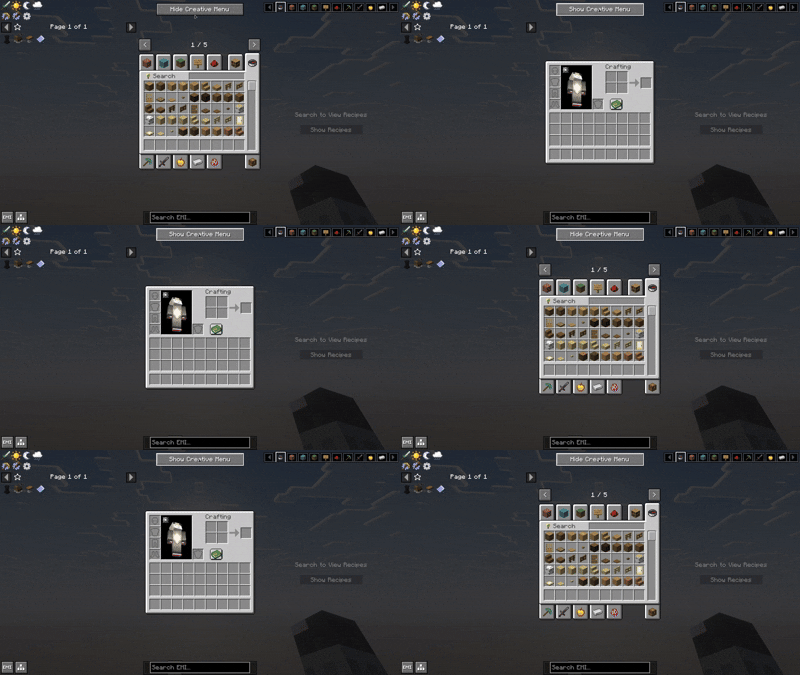
🌍 Global Support
Fully localized for a global community:
- English (US)
- Spanish (ES & LATAM)
- Portuguese (BR)
- Chinese (Simplified)
📜 License & Credits
Developed by Ixeken Studios in México.
Licensed under the MIT License. You are free to include this mod in any modpack!
Chech out my create addon https://modrinth.com/mod/create-easier-sheets
- Edition: Minecraft Java
- File type: .jar
- Minecraft version listed: 26.2
- How to install: Install the matching mod loader (Forge, Fabric or NeoForge) for your Minecraft version. → Download the .jar. → Put it in the .minecraft/mods folder and launch that loader profile.
- Where to get it: Opens on Modrinth — not every file is mirrored on our own servers.
Install steps are the general flow for this file type — How to install Minecraft Java mods & modpacks walks through it step by step.
- Ships as nocreativemenu-1.1.0-universal.jar — drop this file into the mods folder
- Download size: 184 KB
- Download link checked 19 Oct 2026 — working
These come from our own check of the pack file, not from the source page.