Aquamarine
Multiblock library to allow creation of multiblocks in mods easier. This mod help create "Modern Industrialization-like" multiblocks, i.e. multiblocks which have a controller, some innert blocks, and hatch blocks for IO.
Note: This project is very unfinished but works. This is intended as a base library for my other mods using multiblock but can be used by others.
Docs exist but not for everything, still WIP.
Features
Multiblocks
Multiblocks are made of lists both simple members and hatch flags. The simple member defines what block goes at that position. The hatch flags define what hatch types can replace that position. Empty flags can be provided.
Multiblocks can easily access their attached hatches to transfer items/fluids/energy between multiblock and hatch.
Multiblock Rendering
Rendering multiblock previews layer by layer.
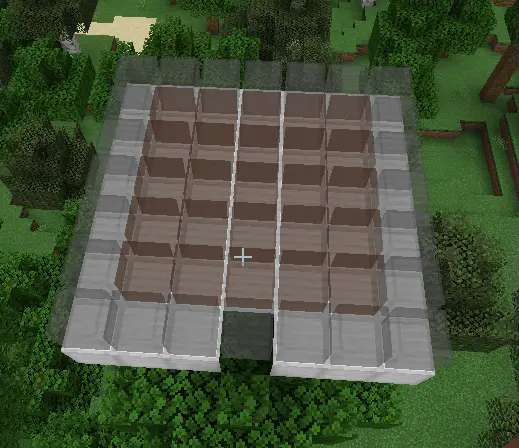
Indicating which blocks can be replaced by hatches.
If a block in the multiblock can be replaced by a hatch that the player is holding, the block will have a green outline around it.
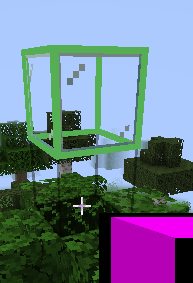
Rendering entire multiblock at one.
Not recommended as it renders weirdly and layer by layer is easier to build.
How to use
Adding dependancy
Add version to gradle.properties
aquamarine_version = 0.0.1-1.21.3 # replace with version id from download page
Add repository to build.gradle
repositories {
  maven { url 'https://jitpack.io' }
}
Add dependency to build.gradle
dependencies {
    modApi "com.github.KrazyMiner001:Aquamarine:${project.aquamarine_version}"
}
Using
Create a class which extends MultiblockBlockEntity and implements methods. Create a class which extends HatchBlockEntity and implements methods. Create blocks for both block entities. Multiblock. (better explanation todo)
- Edition: Minecraft Java
- File type: .jar
- Minecraft version listed: 1.21.3
- How to install: Install the matching mod loader (Forge, Fabric or NeoForge) for your Minecraft version. → Download the .jar. → Put it in the .minecraft/mods folder and launch that loader profile.
- Where to get it: Opens on Modrinth — not every file is mirrored on our own servers.
Install steps are the general flow for this file type — How to install Minecraft Java mods & modpacks walks through it step by step.
- Ships as aquamarine-0.0.3-1.21.3.jar — drop this file into the mods folder
- Download size: 137 KB
- Download link checked 8 Sept 2026 — working
These come from our own check of the pack file, not from the source page.