
The Copper Wrench adds a simple yet powerful tool to Minecraft that allows you to rotate blocks in any direction without breaking them. Whether you're building intricate structures, aligning decorative blocks, or fine-tuning redstone contraptions, this wrench gives you full control over block orientation. Stop wasting time breaking and replacing blocks – with the Copper Wrench, precise placement has never been easier.
Ideal for both survival and creative gameplay, the Copper Wrench is lightweight, easy to use, and compatible with most directional blocks, including stairs, furnaces, dispensers, pistons, and more. It’s a must-have for any builder who wants efficiency, accuracy, and style in their world.
Features:
Adds the Copper Wrench.
Rotate blocks in all directions with a single click.
Works on most blocks with directional properties.
Enhances building and redstone projects without breaking immersion.
Installation:
Make sure you have Fabric Loader 1.xx.x installed.
Download
copper_wrench-1.0.0-fabric-1.21.8.jar.
Place the .jar file into your mods folder.
Launch Minecraft with the Fabric profile.
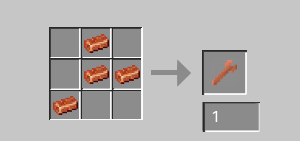
Crafting Recipe:
Copper Wrench:
|-4x Copper Ingots
|-Crafting layout:
Other information
This mod was made using MCreator.
- Edition: Minecraft Java
- File type: .jar
- Minecraft version listed: 1.21.8
- How to install: Install the matching mod loader (Forge, Fabric or NeoForge) for your Minecraft version. → Download the .jar. → Put it in the .minecraft/mods folder and launch that loader profile.
- Where to get it: Opens on Modrinth — not every file is mirrored on our own servers.
Install steps are the general flow for this file type — How to install Minecraft Java mods & modpacks walks through it step by step.
- Ships as copper_wrench-1.0.0-fabric-1.21.8.jar — drop this file into the mods folder
- Download size: 45 KB
- Download link checked 8 Sept 2026 — working
These come from our own check of the pack file, not from the source page.