
With this mod you can draw any image from the Internet on maps. Just copy link of an image and use it to make an art.
Mod Content
Dense Paper
New paper type added by this mod. It's using as base material for this mod.
Pencil
Instrument to draw a sketch. Hold pencil in one hand and dense paper in another and press RMB to create a sketch.
Sketch
Item that stores image URL and can be used in painter table to draw an image.
Sketchbook
Item to store and preview all your sketches. Combine sketchbook and sketch to put it in. You can name sketch book and sketches inside. All sketches inside shown in grayscale (because it sketches).
Painter Table
Main block of this mod. Put sketch ot sketch book with selected sketch inside to configure your art size. You can adjust height and width. One square is one map. Painter table can interact with hoppers to put dyes and dense paper and take map from output slot. Also you can select squares on preview to specify which maps you want to paint.
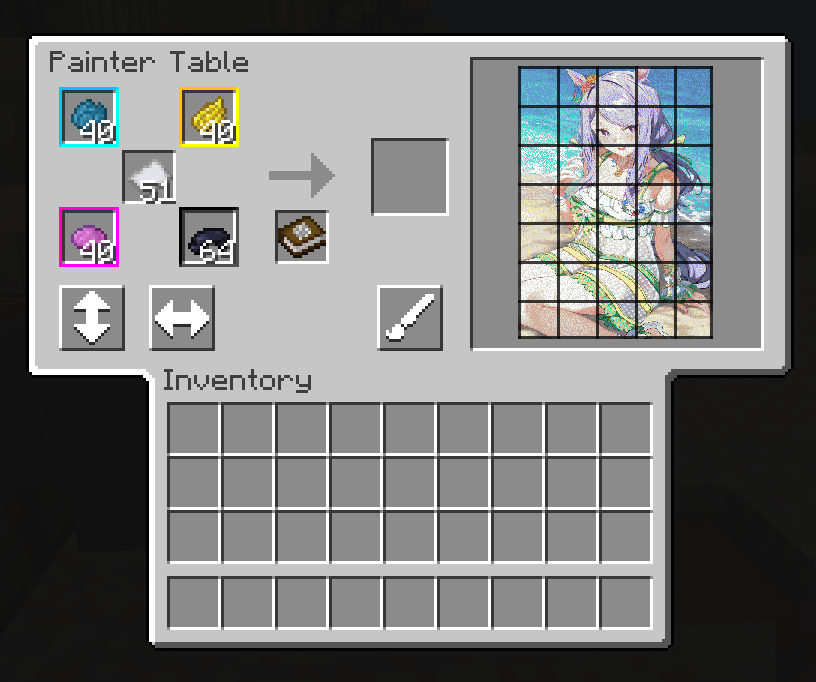
Usage
Note: sketch and sketchbook are replaceable in painter table.
- Craft sketch using dense paper and pencil.
- Put sketch in painter table
- Adjust art size
- Start painting
WIP
Mod in development stage if you want to help please use my GitHub repository. I will grad if some one draw better textures or give some cool ideas.

- Edition: Minecraft Java
- File type: .jar
- Minecraft version listed: 1.20.1
- How to install: Install the matching mod loader (Forge, Fabric or NeoForge) for your Minecraft version. → Download the .jar. → Put it in the .minecraft/mods folder and launch that loader profile.
- Where to get it: Opens on Modrinth — not every file is mirrored on our own servers.
Install steps are the general flow for this file type — How to install Minecraft Java mods & modpacks walks through it step by step.
- Ships as PainterTable-1.20.1-1.0.0-forge.jar — drop this file into the mods folder
- Download size: 158 KB
- Download link checked 8 Sept 2026 — working
These come from our own check of the pack file, not from the source page.