
Stan's deathshot
A Minecraft mod that automatically takes a screenshot whenever you die, saving it along with your coordinates in a neat little folder.
⬇ Download on Modrinth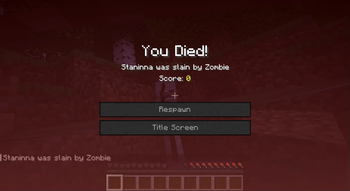
📸 Deathshot
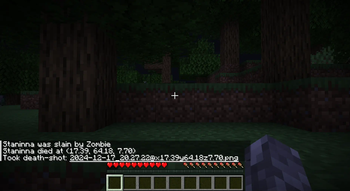
A tiny Minecraft mod that automatically captures your final moments! Every time you die, Deathshot takes a screenshot and saves it along with your coordinates.
✨ Features
- 🎯 Automatically takes screenshots when you die
- 📍 Records the exact coordinates of your death
- 💬 Sends you a clickable message to open the screenshot
- 📁 Organizes screenshots in a dedicated "death-shots" folder
- 🎮 Client-side only - works on any server!
🔧 Installation
- Download the Deathshot mod
- Launch Minecraft and start dying! (in-game, of course 😉)
📸 How it Works
When you die, Deathshot will:
- Take a screenshot of your final moment
- Save it in
{MODRINTH_PROFILE}/death-shots/ - Show you a chat message with:
- A link to open the screenshot
- The coordinates where you died
The screenshots are named with the date, time, and coordinates for easy reference!
📝 Note
The mod is currently built for Minecraft 1.21.4, but feel free to try backporting it to earlier versions!
💝 Credits
Built with Fabric for Minecraft 1.21.4. Idea inspired by this Reddit post and this GitHub repository.
📝 License
All Rights Reserved.
- Edition: Minecraft Java
- File type: .jar
- Minecraft version listed: 1.21.4
- How to install: Install the matching mod loader (Forge, Fabric or NeoForge) for your Minecraft version. → Download the .jar. → Put it in the .minecraft/mods folder and launch that loader profile.
- Where to get it: Opens on Modrinth — not every file is mirrored on our own servers.
Install steps are the general flow for this file type — How to install Minecraft Java mods & modpacks walks through it step by step.
- Ships as stans-deathshot-1.0.0.jar — drop this file into the mods folder
- Download size: 7 KB
- Download link checked 9 Sept 2026 — working
These come from our own check of the pack file, not from the source page.