
ModsJava
Life of Spice: Food Queue
Life of Spice: Food Queue Also in [CurseForge]( Now, when you eat food, it goes into the queue. Food in the queue cannot be eaten again, BUT the size of…
⬇ Download on Modrinth
Life of Spice: Food Queue
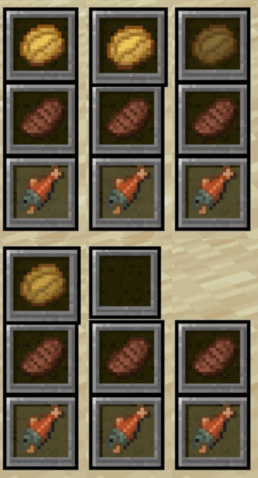
Also in [CurseForge](https://curseforge.com/minecraft/mc-mods/life-of-spice-food-queue)Now, when you eat food, it goes into the queue. Food in the queue cannot be eaten again, BUT the size of the queue, the size of the HUD, the increase in the size of the queue over time, and whether the food should disappear from the queue after a certain amount of time (e.g., after 3 minutes) can all be configured in the settings. Do you want to start the game in your world with one blocking slot, and after an hour of play, add 2 more to the player? All of this can be configured!
Config
The config you need is foodqueue-common.toml
- How big should the slots in the HUD?
- Range: 0.1 ~ 2.0
- slots_size = 0.75
- Reset the queue of eaten food after death?
- reset_queue_after_death = true
- When you first login the world, how many slots were there?
- Range: 1 ~ 6
- blocking_slots_count = 2
- Should food disappear from the queue of eaten items after a certain period of time?
- want_to_food_disappear_after_time_from_queue = true
- After how many minutes should the food disappear from the queue? (This is take Player "Play Time" in world from stats screen)
- Range: 1 ~ 99999
- how_many_minutes_should_to_food_disappear = 4
- Do you want to generally scale the number of slots over time? False here means disabling total scaling!
- blocking_slots_scale_total = true
- After how many MINUTES do you want to add the FIRST slot? (The default setting is 120 minutes, which means that slots will be added 2 hours after the player FIRST enters the game.)
- Range: 1 ~ 99999
- first_slot_scale_after = 120
- How many slots do you want to add?
- Range: 1 ~ 3
- how_many_slots_add_first_time = 1
- Do you want another slot to be added after the first one?
- locking_slots_scale_second = true
- After how many minutes do you want to add the SECOND slot? (The default setting is 180 minutes, which means that slots will be added 3 hours after the player FIRST enters the game. Or one hour after the first slots were added.)
- Range: 1 ~ 99999
- second_slot_scale_after = 180
- How many slots do you want to add again?
- Range: 1 ~ 3
- how_many_slots_add_second_time = 1
Quick facts
- Edition: Minecraft Java
- File type: .jar
- Minecraft version listed: 1.21.1
- How to install: Install the matching mod loader (Forge, Fabric or NeoForge) for your Minecraft version. → Download the .jar. → Put it in the .minecraft/mods folder and launch that loader profile.
- Where to get it: Opens on Modrinth — not every file is mirrored on our own servers.
Install steps are the general flow for this file type — How to install Minecraft Java mods & modpacks walks through it step by step.
Verified by MCModsHub
- Ships as foodqueue-1.0.0+1.21.1.jar — drop this file into the mods folder
- Download size: 21 KB
- Download link checked 9 Sept 2026 — working
These come from our own check of the pack file, not from the source page.