
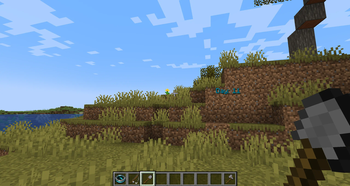
When you play in a Minecraft world, you may want to know how long have you lived in the world.So I spent half an hour making this mod to count days in Minecraft. This mod is simple,but is also configurable.You can create a folder named "simpledaycounter" in the "config" folder, like this:(https://cdn.modrinth.com/data/cached_images/f5001f6156dd82ce2e3a625679fd2e3ed31e6c24.png) and create a file named "config.json". Then write something like this: (https://cdn.modrinth.com/data/cached_images/243b238d336887f3acee971081802e3763f38642.png) { "color":100000, "pos":{"x":60,"y":7} } Directly copy 👆 The color is a decimal representation of a color. This is the rendered character relative to the game coordinates, which is a little troublesome. It is recommended to set the y-coordinate to 80. Note:I may update the project so I will write some instruction texts in the "simpledaycounter" folder.
- Edition: Minecraft Java
- File type: .jar
- Minecraft version listed: 1.20.1
- How to install: Install the matching mod loader (Forge, Fabric or NeoForge) for your Minecraft version. → Download the .jar. → Put it in the .minecraft/mods folder and launch that loader profile.
- Where to get it: Opens on Modrinth — not every file is mirrored on our own servers.
Install steps are the general flow for this file type — How to install Minecraft Java mods & modpacks walks through it step by step.
- Ships as simpledaycounter-1.2.25.jar — drop this file into the mods folder
- Download size: 14 KB
- Download link checked 9 Sept 2026 — working
These come from our own check of the pack file, not from the source page.