
ModsJava
Bats Reconfig
Java mod listed for Minecraft 1.21. Downloads from the MC Java Mods app on Android.
⬇ Download on Modrinth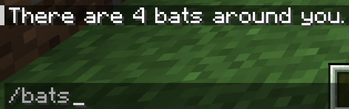

A server-side fabric mod that reconfigures bat spawns
This mod prevents new spawns instead of killing spawns that go beyond the custom limits.
If installed on a server, individual players do not need to install it as well for this mod to work.
Features
- Limit bat spawns up to a certain number.
- Limit bat spawns up to a certain max y level.
- Use command: /bats to check how many bats are around you in a non-immediate despawnable area (128x128x128). Accessible to everyone.
- If you have access to server logs, you can check that the mod outputs the position for each detected bat.
How to use
- Drop this mod into your minecraft mods folder.
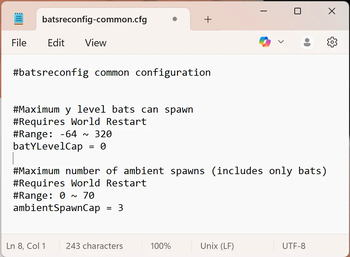
- After starting up the game once, locate the batsreconfig-common.cfg in your minecraft config folder.
- In there, you are able to change each feature value. Default values are already set.
- Restart the game to see new changes.
Dependencies
These need to be installed into your mods folder for the mod to work.
- Fabric API: https://modrinth.com/mod/fabric-api
- Config API: https://modrinth.com/mod/config-api
General Info
- Report any issues or suggestions for improvements in the Github: https://github.com/gittyaulia/bats-reconfig/issues.
Quick facts
- Edition: Minecraft Java
- File type: .jar
- Minecraft version listed: 1.21.5
- How to install: Install the matching mod loader (Forge, Fabric or NeoForge) for your Minecraft version. → Download the .jar. → Put it in the .minecraft/mods folder and launch that loader profile.
- Where to get it: Opens on Modrinth — not every file is mirrored on our own servers.
Install steps are the general flow for this file type — How to install Minecraft Java mods & modpacks walks through it step by step.
File checked by MCModsHub
- Ships as bats-reconfig-1.1.0+1.21.5.jar — drop this file into the mods folder
- Download size: 15 KB
- Download link checked 19 Oct 2026 — working
These come from our own check of the pack file, not from the source page.