
Yet another chat plugin mod aimed to add more chat customization.
All the features below are toggleable, so if you want to have only pings and PMs, you can turn off all the other features in the config.
Features
- Custom Channels which can be customized individually. You can set up message format, chat range, cooldown and fast access prefix for each channel.

- Private messages with custom formatting and /reply command for quick replies.

- @pings in chat with customazible color and sound.

- Roleplay comands for true lovers of immersive interactions.

- Custom color codes so you don't need to search for that '§' symbol to apply colors in chat. Also it adds advanced color codes, read about them below.

- Non-italic /nickname so you can be a true spy.

Advanced color codes
They are currently used for gradients, but maybe i'll add more features to them in future updates.
To get gradients, use following syntax: &{colors, period}. Colors represents one or more colors, alternating in the gradient. Period affects how frequently (in letters) color will change. It's 1 letter per color by default, so you can just type &{colors} if you don't want to change period.
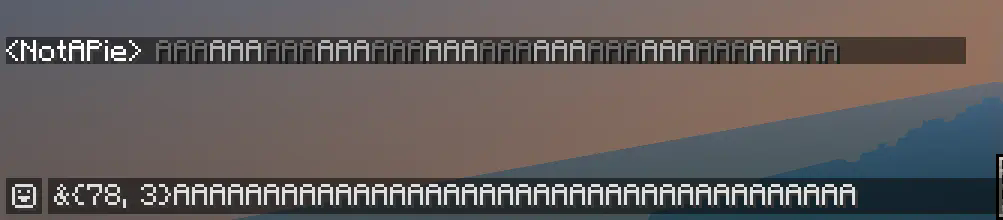
Also you can use alias &{rainbow} to get rainbow text. (periods work here too)
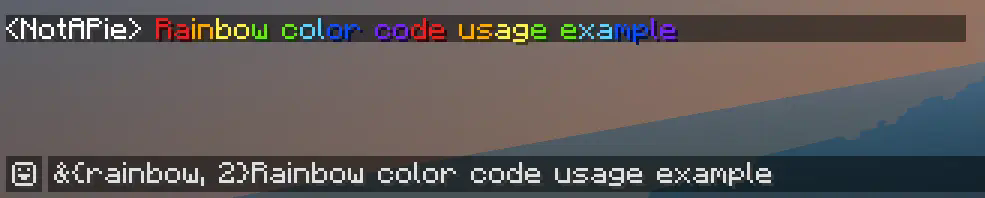
Note that "&" is a default custom color code symbol, so changing it in config affects advanced color codes syntax.
Commands
- /channel (/ch) — used to select default writing channel and display info about current channel.
- /message (/msg, /tell, /whisper) — PM other players.
- /reply (/r) — reply to the latest PM.
- /roll — roll a dice with 6 (or you can select how much) sides.
- /try — describe some action and see if it successeed or not.
- /me — just a roleplay action.
How to install
- Make sure you are hosting a b1.7.3 BTA! Babric server.
- Don't forget to install ServerLibe, the only one dependency of this mod.
- Drop the latest mod version to the
/modsfolder. - Customize chat in
config/cchat.cfg. - Restart your server.
- Enjoy!
This mod uses a modified version of Fabric (Babric) and is designed only for Better than Adventure, a heavily modified version of Minecraft b1.7.3!
- Edition: Minecraft Java
- File type: .jar
- Minecraft version listed: b1.7.3
- How to install: Install the matching mod loader (Forge, Fabric or NeoForge) for your Minecraft version. → Download the .jar. → Put it in the .minecraft/mods folder and launch that loader profile.
- Where to get it: Opens on Modrinth — not every file is mirrored on our own servers.
Install steps are the general flow for this file type — How to install Minecraft Java mods & modpacks walks through it step by step.
- Ships as classic-chat-1.0.0.jar — drop this file into the mods folder
- Download size: 620 KB
- Download link checked 9 Sept 2026 — working
These come from our own check of the pack file, not from the source page.