
Minetivity - Advanced Discord Rich Presence for Minecraft
Why Minetivity?
After searching for a Rich Presence Mod, which I could recommend the users of my Server, I only found outdated ones or ones, which do not have a Server-sided customization function, so I decided to make a new one. And now, here it is: Minetivity.
Usage
You can simply download this file to your mods dirctory. Please make sure, that you also have installed a recent version of the Fabric API, as this mod needs it to run. The mod should simply work, when you have Discord open.
Features
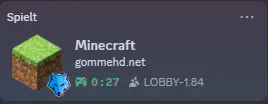
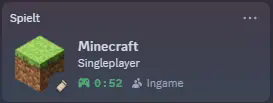
The mod supports several states, including the following ones:
- Menu, displayed when you are not in a world or server
- Singleplayer, when you are in a single player world
- Current server, displayed in format "Playing on play.example.com"
- Reimplementation of the LabyMod Rich Presence Protocol
API
As of right now, there is no official API. However, as we have support for the LabyMod protocol, you can send messages via the LabyMod API or the Protocol.
- Edition: Minecraft Java
- File type: .jar
- Minecraft version listed: 1.20.1
- How to install: Install the matching mod loader (Forge, Fabric or NeoForge) for your Minecraft version. → Download the .jar. → Put it in the .minecraft/mods folder and launch that loader profile.
- Where to get it: Opens on Modrinth — not every file is mirrored on our own servers.
Install steps are the general flow for this file type — How to install Minecraft Java mods & modpacks walks through it step by step.
- Ships as Minetivity-1.20.1-1.0.0.jar — drop this file into the mods folder
- Download size: 2.0 MB
- Download link checked 9 Sept 2026 — working
These come from our own check of the pack file, not from the source page.