
Zzoyn Markers
Java mod listed for Minecraft 1.20. Downloads from the MC Java Mods app on Android.
⬇ Download on Modrinth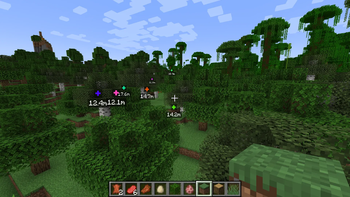



Zzoyn Markers
Clean 3D world-space markers for perfect teamwork
Zzoyn Markers adds a minimal and precise 3D marker system, rendered directly in the world — not on the HUD.
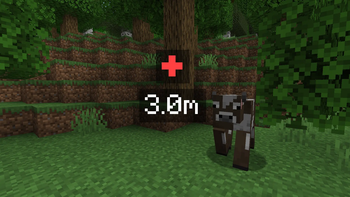
Place a marker with a keypress, and your teammates instantly see a floating distance label exactly where you pointed.
Smooth, readable and tactical — perfect for PvP and squad-based gameplay.
Features
- 3D world marker at the exact targeted location
- Visible through blocks (just like tactical pings in shooters)
- Smooth fade-in / fade-out animation
- Randomized marker colors for easier visual distinction
- Automatic distance display
- Marker distance automatically scales with your render distance
→ Max ping range = your render distance in blocks × 16 + 50 - Fully team-based marker sharing
- Lightweight, clean and performance-friendly
Commands
Built-in team system so your markers stay private unless you choose to share them.
/madd <player>
Adds the player to your marker team.
They will see all markers you create.
/mkick <player>
Removes the player from your marker team.
They will no longer receive your markers.
/mleave
You leave your own marker team.
Others will no longer see your markers until you form a new team.
Perfect for
- Tactical PvP
- Squad-based gameplay
- Military / mil-sim servers
- RP missions and scenarios
- Exploration with friends
- Any situation where you need a clean “ping” without clutter
Why this mod?
Unlike minimap waypoints or HUD icons, Zzoyn Markers places information directly into the world, making communication fast and intuitive — exactly how modern tactical games do it.
Clean. Precise. Zero noise.
- Edition: Minecraft Java
- File type: .jar
- Minecraft version listed: 1.20.1
- How to install: Install the matching mod loader (Forge, Fabric or NeoForge) for your Minecraft version. → Download the .jar. → Put it in the .minecraft/mods folder and launch that loader profile.
- Where to get it: Opens on Modrinth — not every file is mirrored on our own servers.
Install steps are the general flow for this file type — How to install Minecraft Java mods & modpacks walks through it step by step.
- Ships as zzoyn-markers-1.0.0.jar — drop this file into the mods folder
- Download size: 1.1 MB
- Download link checked 19 Oct 2026 — working
These come from our own check of the pack file, not from the source page.