
Defaults Commands Without Plugins
Java mod listed for Minecraft 1.20. Downloads from the MC Java Mods app on Android.
⬇ Download on Modrinth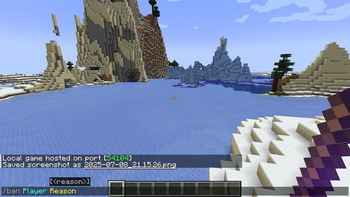
ENG:
What does this mod do?
Defaults Command Without Plugins adds basic admin commands (/ban, /kick, /warn) to your server as a simple Forge mod. No more searching for plugins - everything you need is already here
The mod also adds a unique tool - Moderator's Wand, which allows you to perform actions with one hit.
[IMPORTANT] This is a server mod! It must be installed only on the server (or in the host client). Other players do not need to download this mod to join the server.
How to use?
- To use commands, you must have operator rights
- Type
/getmodstickin the chat to get the Moderator's Wand. - Right mouse button (in the air): Toggles the wand mode (Kick -> Warn -> Ban).
- Left mouse button (hit a player): Applies the selected action to the player.
Commands
/getmodstick- Gives the Moderator Wand./kick <nick> [reason]- Kicks a player./warn <nick> <reason>- Sends a warning to a player./ban <nick> [reason]- Bans a player.
RU:
Что делает этот мод?
Defaults Command Without Plugins добавляет базовые команды администрирования (/ban, /kick, /warn) на ваш сервер в виде простого Forge мода. Больше не нужно искать плагины — все необходимое уже здесь
Также мод добавляет уникальный инструмент — Палочку Модератора, которая позволяет выполнять действия одним ударом.
[IMPORTANT] Это серверный мод! Устанавливать его нужно только на сервер (или в клиент хоста). Другим игрокам не нужно скачивать этот мод, чтобы зайти на сервер.
Как использовать?
- Чтобы использовать команды, у вас должны быть права оператора.
- Пропишите в чате
/getmodstick, чтобы получить Палочку Модератора. - Правая кнопка мыши (в воздухе): переключает режим палочки (Кик -> Варн -> Бан).
- Левая кнопка мыши (удар по игроку): применяет выбранное действие к игроку.
Команды
/getmodstick- Выдает Палочку Модератора./kick <ник> [причина]- Кикает игрока./warn <ник> <причина>- Отправляет игроку предупреждение./ban <ник> [причина]- Банит игрока.
Создано MrIceGreen.
- Edition: Minecraft Java
- File type: .jar
- Minecraft version listed: 1.20.1
- How to install: Install the matching mod loader (Forge, Fabric or NeoForge) for your Minecraft version. → Download the .jar. → Put it in the .minecraft/mods folder and launch that loader profile.
- Where to get it: Opens on Modrinth — not every file is mirrored on our own servers.
Install steps are the general flow for this file type — How to install Minecraft Java mods & modpacks walks through it step by step.
- Ships as defaultscommand-1.0.0.jar — drop this file into the mods folder
- Download size: 15 KB
- Download link checked 19 Oct 2026 — working
These come from our own check of the pack file, not from the source page.