
Crosshair Item Count
Java mod listed for Minecraft 1.20. Downloads from the MC Java Mods app on Android.
⬇ Download on Modrinth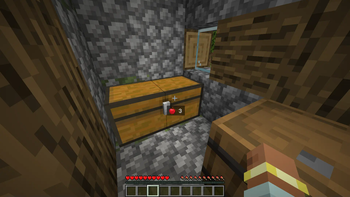

🧿 Crosshair Item Count
No more opening every chest to find what you need — with Crosshair Item Count, just look at a container and instantly see the most common item inside displayed under your crosshair, along with its quantity. Perfect for quick storage scans, sorting systems, or looting on the go.
🔍 Features
Shows the most frequent itemstack in chests, barrels, and more
Item icon and count appear subtly under your crosshair
Works in both survival and creative modes
🧰 Lightweight and Compatible
- Designed to be non-intrusive and play nice with other HUD or performance mods.
🎯 Perfect For Organized builders, redstone engineers, or anyone tired of guessing what’s in that box.
- Edition: Minecraft Java
- File type: .jar
- Minecraft version listed: 1.20.1
- How to install: Install the matching mod loader (Forge, Fabric or NeoForge) for your Minecraft version. → Download the .jar. → Put it in the .minecraft/mods folder and launch that loader profile.
- Where to get it: Opens on Modrinth — not every file is mirrored on our own servers.
Install steps are the general flow for this file type — How to install Minecraft Java mods & modpacks walks through it step by step.
- Ships as CrosshairItemCount-1.0-SNAPSHOT.jar — drop this file into the mods folder
- Download size: 27 KB
- Download link checked 19 Oct 2026 — working
These come from our own check of the pack file, not from the source page.