

What is N'hyras Fancy Things?
Back in 2013 I created a mod that allowed you to craft colored wooden planks by putting a Paintbrush into a crafting table, surrounded with the vanilla blocks! But that was LAME! So I'm taking an entirely different, and more immersive approach to painting blocks. But don't worry, this isn't all about painting things pretty colors! This time it's all about creativity as a whole.
What are the plans for this Mod?
Painting Blocks
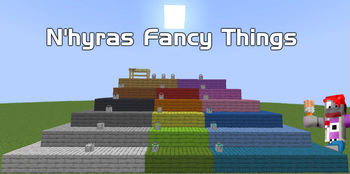
Each type of wooden plank will have 6 different variants. These can be achieved by Right-Clicking a block with a Colored paintbrush. Some of the Variants can only be achieved by Right-Clicking an already painted block with a different color.. Like actual painting! These different styles will be in the form of different patterns, designed so that you can create custom-painted walls made of different tiles.
Fancier Fences
I've opted to create a new type of fence block. Vanilla fences look like basic 4x4 lumber which is fine for function. But what about that white picket fence life we all dreamed about as cheesy movie characters in the 90's? But the fences don't have to be white. Make them any color you want!
Smoother Stairs
I always found the Vanilla stairs to be a bit bumpy, so I wanted to create ones with 50% smaller steps, which gives them 4 steps per block. Especially when playing in VR, walking up stair is very VUHVUHVUH (Technical Term). These ones are undeniably nicer to walk up.
A Bigger Workbench
To be able to make more involved crafting recipes that can be done in a single step, I wanted a much larger crafting grid to work with. So I took my real-life work bench and turned it into a block within the game! Now you can can craft life I do IRL, overly complicated!
- Edition: Minecraft Java
- File type: .jar
- Minecraft version listed: 1.21.1
- How to install: Install the matching mod loader (Forge, Fabric or NeoForge) for your Minecraft version. → Download the .jar. → Put it in the .minecraft/mods folder and launch that loader profile.
- Where to get it: Opens on Modrinth — not every file is mirrored on our own servers.
Install steps are the general flow for this file type — How to install Minecraft Java mods & modpacks walks through it step by step.
- Ships as nhyras_fancy_things-a0.1.2-neoforge-1.21.1.jar — drop this file into the mods folder
- Download size: 2.1 MB
- Download link checked 9 Sept 2026 — working
These come from our own check of the pack file, not from the source page.