
A mod that adds a Source Engine style voice command menu system to send commands and chat messages. Think of it as a chat bind system.
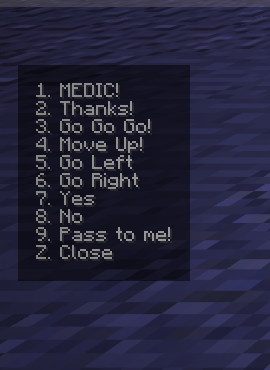
The default values mimic those present in Team Fortress 2, but are entirely customizable.
Similar to how it works in TF2, you first open the menu to view the list of commands, and then use your hotbar slot keybinds to select the command to run. For consistency, selecting a command does not change your currently selected slot. This behavior can be disabled in the options.
Features
- Customizable chat messages
- All commands present in the menus can be customized from the message sent to the shorthand message that appears on the menu itself.
- Custom user defined message prefix
- You can define a global prefix to use for all menus, or define an override per each menu
- Supports commands, if the prefix starts with a
/, it'll be sent as a command - Additionally, each individual entry can be configured to run a different command


Keybinds
| Key(s) | Action |
|---|---|
| Z, X, C | Open Voice Menu 1-3 |
| Hotbar Slot 1-9 | Issue voice command |
| F8 | Open Mod options screen |
Disclaimer
This project is not affiliated with, endorsed by, or associated with Valve Corporation. Source Engine and Team Fortress are trademarks of Valve Corporation.
- Edition: Minecraft Java
- File type: .jar
- Minecraft version listed: 26.2
- How to install: Install the matching mod loader (Forge, Fabric or NeoForge) for your Minecraft version. → Download the .jar. → Put it in the .minecraft/mods folder and launch that loader profile.
- Where to get it: Opens on Modrinth — not every file is mirrored on our own servers.
Install steps are the general flow for this file type — How to install Minecraft Java mods & modpacks walks through it step by step.
- Ships as voicecommands-1.1.1.jar — drop this file into the mods folder
- Download size: 25 KB
- Download link checked 9 Sept 2026 — working
These come from our own check of the pack file, not from the source page.