
End Compass
The mod adds a special compass in Minecraft that points to the nearest End Gateway instead of spinning randomly in the End.
⬇ Download on Modrinth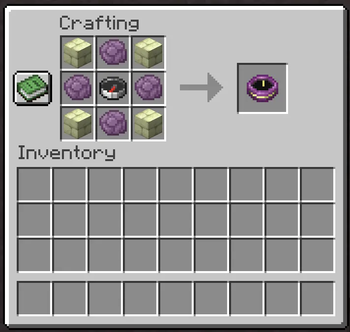
Exploring the End to find an End Gateway can get annoying pretty fast.





🎯 What it does
End Compass adds a simple compass that points to the nearest End Gateway, so you don't have to randomly bridge across islands anymore.
It doesn't change progression.
It doesn't add overpowered mechanics.
It just makes End exploration less frustrating.
🔨 Crafting Recipe
To craft the End Compass, you'll need:
| Ingredient | Amount |
|---|---|
| 🍇 Popped Chorus Fruit | 4× |
| 🧭 Compass | 1× |
| 🪨 End Stone Bricks | 4× |
Once crafted, it will point to the nearest End Gateway — but only while you're in the End.
📦 Installation
- Download the version matching your Minecraft version and mod loader.
- Place the
.jarfile into yourmodsfolder:.minecraft/mods/ - Launch the game!
🔧 Requirements
| Loader | Dependencies |
|---|---|
| Fabric | Fabric API + Fabric Loader |
| NeoForge | NeoForge (no additional libraries needed) |
🤝 Contributing
Suggestions and pull requests are welcome.
Discord: itzchoko_
📜 License
Distributed under the MIT License.
Made with ❤️ by ItzChoko.
- Edition: Minecraft Java
- File type: .jar
- Minecraft version listed: 26.2
- How to install: Install the matching mod loader (Forge, Fabric or NeoForge) for your Minecraft version. → Download the .jar. → Put it in the .minecraft/mods folder and launch that loader profile.
- Where to get it: Opens on Modrinth — not every file is mirrored on our own servers.
Install steps are the general flow for this file type — How to install Minecraft Java mods & modpacks walks through it step by step.
- Ships as end_compass-neoforge-26.2-1.0.0.jar — drop this file into the mods folder
- Download size: 231 KB
- Download link checked 9 Sept 2026 — working
These come from our own check of the pack file, not from the source page.