
ModsJava
Stockkeeping
Java mod listed for Minecraft 1.20. Downloads from the MC Java Mods app on Android.
⬇ Download on Modrinth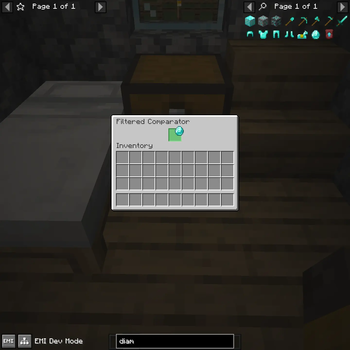
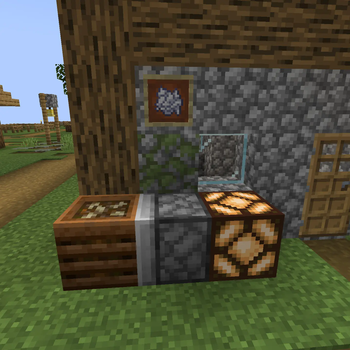
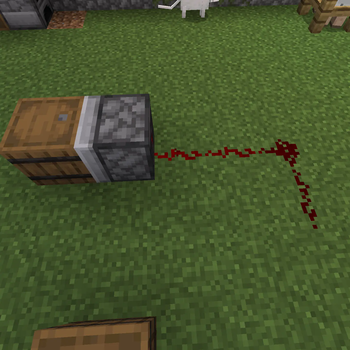

Adds a comparator-like block that reads the amount of an item in the inventory it faces.
The filtered comparator can be placed in any direction, and outputs an analogue redstone signal like a comparator facing the inventory-containing block (or, inventory-containing minecart on a detector rail) - but the filtered comparator only counts the item in it's filter slot.
Performance
- To avoid constantly checking each inventory every tick, the Filtered Comparator only updates upon a comparator update from the block it's facing.
- (This may cause edge cases with inventories that don't output comparator updates, or upon placement facing a chest minecart with no detector rail.)
Compatibility
- Supports drag and drop for setting filters by EMI.
- The Serial Port from TIS-3D can read the exact number of detected items (provided it fits in a short, that is.)
- Functions as an InRed device for YTTR's WIP Cuprosteel wires, providing a range from 0-63 that doesn't attenuate.
...And lack thereof
- Whilst I'm unsure, I believe this will not function with Modern Industrialization machines, as from what I recall, those do not output Comparator Updates.
- If an inventory cannot be seen by an unmodified vanilla hopper, then the Filtered Comparator will be unable to read it.
Mixins
AbstractBlockStateMixin: injects at the head ofisOfto returntrueif a Filtered Comparator is checked if it's a regular comparator.World: injects at the head ofupdateComparatorsto also update vertically, but only for Filtered Comparators.- Several mixins to itself for adding conditional compatibility for YTTR when both mods are loaded.
Quick facts
- Edition: Minecraft Java
- File type: .jar
- Minecraft version listed: 1.20.1
- How to install: Install the matching mod loader (Forge, Fabric or NeoForge) for your Minecraft version. → Download the .jar. → Put it in the .minecraft/mods folder and launch that loader profile.
- Where to get it: Opens on Modrinth — not every file is mirrored on our own servers.
Install steps are the general flow for this file type — How to install Minecraft Java mods & modpacks walks through it step by step.
File checked by MCModsHub
- Ships as stockkeeping-1.4.jar — drop this file into the mods folder
- Download size: 111 KB
- Download link checked 19 Oct 2026 — working
These come from our own check of the pack file, not from the source page.