
📖 About the Mod
The Diary Command Mod introduces a fully customizable diary system into Minecraft, giving players the ability to record their journey, discoveries, and personal notes directly in-game. Instead of relying on external notes or remembering everything, this mod provides an immersive way to keep track of your adventures with simple commands.
With the /diary command, players gain access to a book & quill interface that serves as their personal diary. Unlike the vanilla book & quill, this diary comes with unlimited storage, allowing you to write and save as much information as you need without ever running out of space.
✨ Features
✍️ Write Notes – Use /diary notes to write down reminders, ideas, or anything else you want to remember.
📍 Save Coordinates – Store important locations like bases, villages, strongholds, or hidden treasures with /diary coords.
⏰ Track Time – Record the current in-game time using /diary time to keep logs or mark special moments.
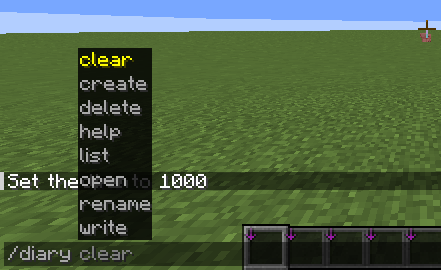
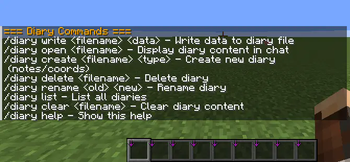
📂 File Management – Create your own diary files with /diary create , open them with /diary open , rename, delete, or list them whenever needed.
📖 Organized Storage – Keep multiple diaries for different purposes, such as exploration logs, building projects, or resource tracking.
🔒 Client-Side Only – All diary files and commands are stored locally, ensuring your notes are personal and not shared with a server.
🗂️ Utility Commands – /diary help lists all commands, and /diary clear lets you wipe everything if you want a fresh start.
🧭 Why Use This Mod?
This mod is perfect for players who love organization, roleplay, or storytelling. You can use it as a travel journal, a project planner, or even a roleplay diary that grows with your character. Whether you’re documenting your first diamond find, logging coordinates of your secret base, or keeping a daily survival journal, the Diary Command Mod makes it seamless and fun.
- Edition: Minecraft Java
- File type: .jar
- Minecraft version listed: 1.21.10
- How to install: Install the matching mod loader (Forge, Fabric or NeoForge) for your Minecraft version. → Download the .jar. → Put it in the .minecraft/mods folder and launch that loader profile.
- Where to get it: Opens on Modrinth — not every file is mirrored on our own servers.
Install steps are the general flow for this file type — How to install Minecraft Java mods & modpacks walks through it step by step.
- Ships as easy-safe-1.21.10.jar — drop this file into the mods folder
- Download size: 26 KB
- Download link checked 9 Sept 2026 — working
These come from our own check of the pack file, not from the source page.