
What does this mod add?
This mod adds the item Upgrading Template and some recipes that allows you to use less resources when upgrading your Tools/Armor
For example:
- Iron Tools/Armors to Golden Tools/Armors recipe.
- Smithing Template recipe that is made with a Diamond And an Upgrading Template
Recipes
Template recipes
Upgrading Template recipe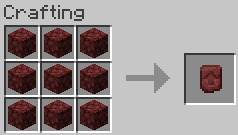
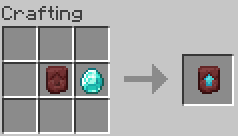
Tools/Armors recipes
You can upgrade tool to a higher version by putting the items in the order shown in the picture:
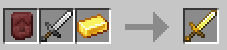
Things that you can put in the slots in the Smithing Table to upgrade your tool using the Upgrading Template:
Left slot Upgrading Template, as this is the required item to upgrade your tools. Middle slotThe tool that you want to upgrade.
Theese can be any vanilla Iron Tool/Armor or any vanilla Golden Tool/Armor.
Right slotThe tier's ingot that you want to upgrade to.
Theese can be Gold Ingot or Diamond
Requirements

Quick facts
- Edition: Minecraft Java
- File type: .jar
- Minecraft versions listed: 1.20, 1.20.1, 1.20.2
- How to install: Install the matching mod loader (Forge, Fabric or NeoForge) for your Minecraft version. → Download the .jar. → Put it in the .minecraft/mods folder and launch that loader profile.
- Where to get it: Opens on Modrinth — not every file is mirrored on our own servers.
Install steps are the general flow for this file type — How to install Minecraft Java mods & modpacks walks through it step by step.
Verified by MCModsHub
- Ships as upgradingtemplate-1.0.0-fabric-1.20.1.jar — drop this file into the mods folder
- Download size: 18 KB
- Download link checked 9 Sept 2026 — working
These come from our own check of the pack file, not from the source page.