
SafeSquares
Beta 1.7.3 mod to highlight blocks that mobs can spawn on in the world. Inspired by Zombe's Modpack's 'safe' mod.
⬇ Download on Modrinth

SafeSquares
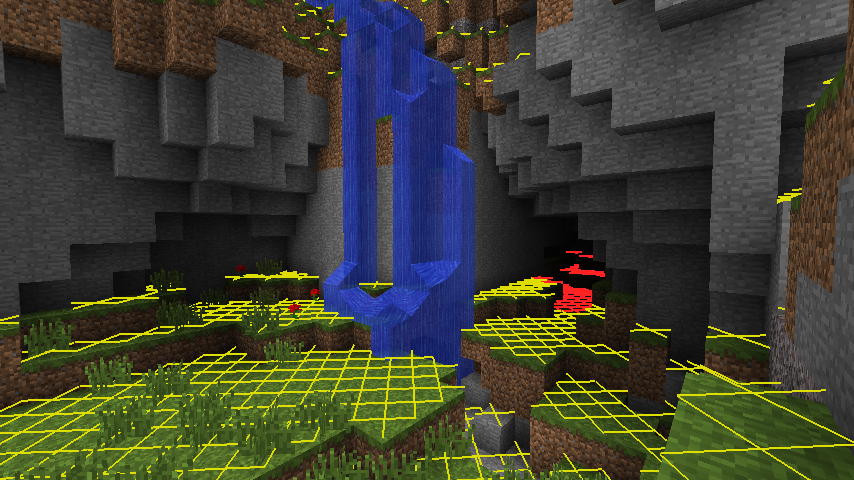
SafeSquares is a mod for Minecraft Beta 1.7.3 that adds a light-level overlay on top of blocks, in the style of the "safe" mod from Zombe's Modpack. When enabled with the hotkey (L by default), blocks that monsters can spawn on will be highlighted with a red cross, or a yellow cross if they can only spawn there during night.
Requirements
- Minecraft Beta 1.7.3
- Babric
- StationAPI
- Fabric Language Kotlin
Recommended
- Mod Menu Babric (for in-game configuration)
Configuration
The mod's keyboard shortcut (L by default) can be configured in the in-game Controls menu. All other settings
can be configured in-game (if Mod Menu Babric is installed) or in
.minecraft/config/safesquares/safesquares.yml.
License
This mod and its source code is licensed under the MIT license.
Disclaimer
The source code from Zombe's Modpack was not used to develop this mod. AI tooling and large language models were not used to develop this mod. AI-generated contributions will not be accepted.
- Edition: Minecraft Java
- File type: .jar
- Minecraft version listed: b1.7.3
- How to install: Install the matching mod loader (Forge, Fabric or NeoForge) for your Minecraft version. → Download the .jar. → Put it in the .minecraft/mods folder and launch that loader profile.
- Where to get it: Opens on Modrinth — not every file is mirrored on our own servers.
Install steps are the general flow for this file type — How to install Minecraft Java mods & modpacks walks through it step by step.
- Ships as safesquares-1.2.0.jar — drop this file into the mods folder
- Download size: 34 KB
- Download link checked 9 Sept 2026 — working
These come from our own check of the pack file, not from the source page.