
MC Classic: Resurrected
A work-in-progress project that aims to recreate the old alpha/beta Minecraft features by adding new blocks, dimensions, biomes, and items!
⬇ Download on Modrinth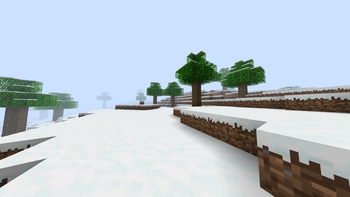
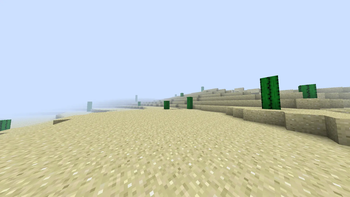
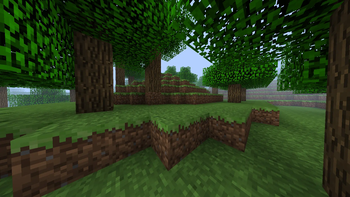
Minecraft Classic: Resurrected, A blast from the past mod made just for people who love nostalgia, but don't want to give up the newer features 1.20 Minecraft has to offer.
This work in progress project aims to recreate the old Minecraft Alpha/Beta look and feel by adding new items, blocks, dimensions, and biomes.
Reading the changelogs when a new update comes out can really help clear up any confusion on newly added features.
Playing this mod with a classic texture pack (Like programmer art or Golden Days) can really take away from the mod's features, as it makes it a lot harder to tell which features are vanilla and which features are modded.
This mod currently adds:
A variety of new blocks, some craftable and some generating naturally.
A variety of new items, tools, weapons, and foods.
New plants and crops
New biomes and dimensions to explore
A brand new acievement tab with 21 new achievements to obtain
This mod works really good when paired with other mods like Nostalgia Tweaks. If you are looking for a Classic Minecraft experience but you don't want to give up the modern game and features, then look no further! Using this mod basically lets you play dual-versions of Minecraft. You could make a house with a Classic Cobblestone floor, and a modern cobblestone roof. So this mod is for people who want old features and new features at the same time.
I'm stuck and dont know what this mod does!
To get started, create a new world. Don't use any mods that add their own world type (Like Moderner Beta) because then the biomes from this mod won't generate, and you won't be able to get anything from this project. Once your world is created, explore around and look for one of the naturally-generating Classic biomes. Once a Classic biome is discovered, you can enter a cave in the biome and look for chunks of Classic Obsidian, Classic Gravel and Classic Iron Ore. Once you've found at least 10 Classic Obsidian, 1 Classic Iron Ingot and 1 Classic Flint, you can build a Classic Nether Portal Frame and craft Classic Flint & Steel. If you light the portal with the Classic Flint & Steel, you will be taken to the Classic Nether (which currently has no features yet, but is still cool.) If you wish to visit infinite versions of the Classic Biomes, look in the Crafting Table recipe book for instructions on how to craft the respective Flint & Steel versions for each biome. The mod Just Enough Items can help with this as well.
Information about the new Achievement Tree:
All achievements are based off the classic items not the modern ones, And the achievements are just ripped from beta Java Minecraft.
The 'Taking Inventory' achievement is still WIP until I figure out how to make a function in MCreator for it.
Some features will be a work-in-progress for a while because there are some limitations to MCreator that I need to find workarounds for. And some workarounds take longer than others because I have close to zero MCreator experience and when I use ChatGPT for help it has errors and issues a lot more than I'd like to admit.
Away from that, and last but not least, Enjoy!
- Edition: Minecraft Java
- File type: .jar
- Minecraft version listed: 1.20.1
- How to install: Install the matching mod loader (Forge, Fabric or NeoForge) for your Minecraft version. → Download the .jar. → Put it in the .minecraft/mods folder and launch that loader profile.
- Where to get it: Opens on Modrinth — not every file is mirrored on our own servers.
Install steps are the general flow for this file type — How to install Minecraft Java mods & modpacks walks through it step by step.
- Ships as minecraft_classic_resurrected-0.0.9-forge-1.20.1.jar — drop this file into the mods folder
- Download size: 2.2 MB
- Download link checked 9 Sept 2026 — working
These come from our own check of the pack file, not from the source page.