
ModsJava
SignBoard Preview
Java mod listed for Minecraft 1.21. Downloads from the MC Java Mods app on Android.
Adds floating text displays above signs in Minecraft, making your sign content more visible! Supports both regular and hanging signs.
⬇ Download on Modrinth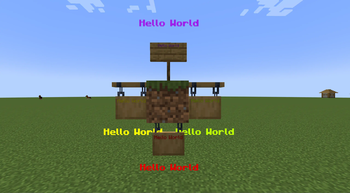
This mod adds a simple yet practical feature to Minecraft: floating text displays above (or below) signs.
Key Features:
- Automatically displays floating text above signs
- Full support for both regular and hanging signs
- Preserves all vanilla sign features (such as colors)
- Floating text updates automatically with sign content
- Handles text display when players enter/leave the world
How to Use:
- Place and edit signs as usual
- Text will automatically appear above (regular signs) or below (hanging signs)
- Supports all sign features:
- Use dyes to change text color
- Supports multi-line text display
Perfect for:
- Shop price displays
- Building labels
- Any scenario requiring clear text display
Quick facts
- Edition: Minecraft Java
- File type: .jar
- Minecraft version listed: 1.21.4
- How to install: Install the matching mod loader (Forge, Fabric or NeoForge) for your Minecraft version. → Download the .jar. → Put it in the .minecraft/mods folder and launch that loader profile.
- Where to get it: Opens on Modrinth — not every file is mirrored on our own servers.
Install steps are the general flow for this file type — How to install Minecraft Java mods & modpacks walks through it step by step.
File checked by MCModsHub
- Ships as signboardpreview-1.21.4-1.1.jar.jar — drop this file into the mods folder
- Download size: 15 KB
- Download link checked 10 Nov 2026 — working
These come from our own check of the pack file, not from the source page.