
Advanced Damage Indicator
Java mod listed for Minecraft 1.21. Downloads from the MC Java Mods app on Android.
⬇ Download on Modrinth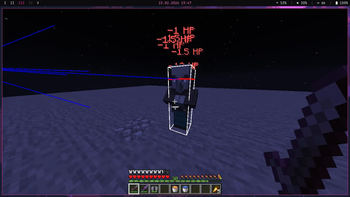
Advanced Damage Indicator (ADI)
Advanced Damage Indicator (ADI) allows full customization of how damage is displayed.
Damage can be shown either in a custom HUD or as a hologram, powered by the Hologram API.
Installing Mod Menu enables quick and easy configuration directly in-game.
Configuration
Display format:
- Hearts
- HP
Display type:
- Hologram
- HUD
Target:
- Mobs
- Players
- All
What to show:
- Damage
- Healing
Display duration
HUD Customization
The HUD can be configured by assigning a keybind in Minecraft controls to open the settings menu.
Warning
Some servers prohibit mods that display dealt damage. Always check server rules before using ADI.
- Edition: Minecraft Java
- File type: .jar
- Minecraft version listed: 1.21.11
- How to install: Install the matching mod loader (Forge, Fabric or NeoForge) for your Minecraft version. → Download the .jar. → Put it in the .minecraft/mods folder and launch that loader profile.
- Where to get it: Opens on Modrinth — not every file is mirrored on our own servers.
Install steps are the general flow for this file type — How to install Minecraft Java mods & modpacks walks through it step by step.
- Ships as adi-1.0.0.jar — drop this file into the mods folder
- Download size: 1.0 MB
- Download link checked 20 Oct 2026 — working
These come from our own check of the pack file, not from the source page.