
Fake Weather
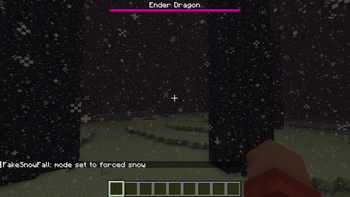
Client-only fake weather that looks vanilla. Toggle rain, snow, thunder, or return to server weather—no indoor rain noise.
⬇ Download on Modrinth



Short description
Client-only fake weather with vanilla visuals and global precipitation modes — force rain, snow, or storms anywhere while keeping interiors quiet.
Overview
FakeSnowFall gives you full client-side control over weather visuals without touching the server. It preserves vanilla rendering and behavior where you want it, and adds powerful new modes that let you force precipitation globally — while muting indoor rain noise for a cleaner experience.
Key features
- Client-only: No server mod required; works on any server or singleplayer world.
- Vanilla visuals: Uses the game’s native rain, snow, and thunder rendering for a natural look.
- Global precipitation modes: Force rain, snow, or storm everywhere, ignoring biomes and dimensions.
- Vanilla modes: Use vanillarain and vanillastorm to let biomes decide precipitation like vanilla.
- Quiet interiors: Mutes indoor rain sound while fake weather is active.
- Instant toggles: Switch modes with a single client command.
- Noninvasive: Server logic, gameplay mechanics, and mob behavior remain unchanged.
Commands
- /fakeweather rain — Force rain everywhere, regardless of biome or dimension.
- /fakeweather snow — Force snow everywhere, regardless of biome or dimension.
- /fakeweather storm — Force a global thunderstorm with thunder effects.
- /fakeweather vanillarain — Enable rain that follows vanilla biome rules.
- /fakeweather vanillastorm — Enable vanilla storm behavior that follows biomes.
- /fakeweather server — Revert to the server’s actual weather.
Why use this mod
Use FakeSnowFall to set the mood for screenshots, streams, or building sessions without asking the server to change. Create dramatic storms in deserts, peaceful snow in jungles, or cinematic thunder in the End — all locally and instantly.
- Edition: Minecraft Java
- File type: .jar
- Minecraft version listed: 1.16.5
- How to install: Install the matching mod loader (Forge, Fabric or NeoForge) for your Minecraft version. → Download the .jar. → Put it in the .minecraft/mods folder and launch that loader profile.
- Where to get it: Opens on Modrinth — not every file is mirrored on our own servers.
Install steps are the general flow for this file type — How to install Minecraft Java mods & modpacks walks through it step by step.
- Ships as FakeWeather1.0.0.jar — drop this file into the mods folder
- Download size: 14 KB
- Download link checked 10 Sept 2026 — working
These come from our own check of the pack file, not from the source page.