


BGM Fields (Forge 1.20.1)
🎥 **Watch the BGM Fields demo:**
https://www.youtube.com/shorts/meaJewowPdg
BGM Fields lets you place Realm Blocks that create server-authoritative “BGM zones” (Realms). When a player is inside a Realm, the Realm can:
- Switch BGM (single track or playlist)
- Apply “Vision” visuals (fog / overlay / sky-only tint / particles / colored precipitation)
- Optionally render a glowing boundary ring (visible from inside and outside)
This mod does not send .ogg audio files over the network. Music is referenced by Sound Event IDs; you provide the actual audio via a client resource pack (per-player) or a server-pushed resource pack.
Multiplayer: install the mod on both the server and all clients.
Getting Started
- Craft and place a Realm Block.
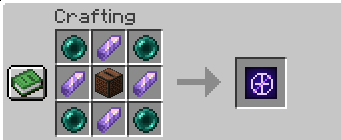
- Right-click the Realm Block to open the settings screen.
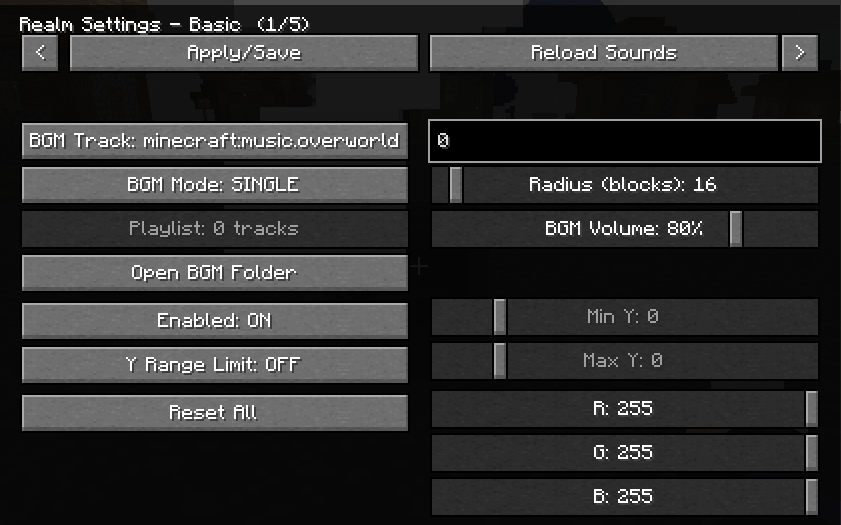
- Set:
- Radius (max 300)
- Y-range (optional; you can limit the realm vertically)
- Realm color (used by visuals)
- BGM settings (track or playlist)
- Per-realm BGM volume (0–100, default 80)
Only the owner can edit the Realm. OPs (permission level 2) can also edit.
Realm Placement Rules
- If another player’s Realm overlaps the new one, placement is denied.
- Even for the same owner, partial overlap is denied.
- Full nesting is allowed (one Realm completely inside the other).
BGM: How Tracks Work
A track is a Sound Event ID (namespace:path). Examples:
- Vanilla music:
minecraft:music.overworld - User BGM generated by this mod:
bgmfieldmod:bgm.my_song
BGM Modes:
- Single: play one Sound Event.
- Playlist: multiple entries; each entry has:
track(Sound Event ID)loop(true/false)
Add Your Own Music (Client-side, per player)
BGM Fields auto-creates a folder resource pack called:
BGMFields_UserBGM
Put your .ogg files under:
resourcepacks/BGMFields_UserBGM/assets/bgmfieldmod/sounds/bgm/
Then reload resources (in-game “Reload” button or F3+T).
You do not need to write sounds.json yourself; BGM Fields generates it automatically.
Sound ID mapping:
my_song.ogg→bgmfieldmod:bgm.my_songdungeon/boss.ogg→bgmfieldmod:bgm.dungeon.boss
Notes:
- Filenames are sanitized to valid resource paths (spaces, uppercase, etc. are converted).
- The resource pack still needs to be enabled in Minecraft’s Resource Packs menu (that is vanilla behavior). There is also an optional client config that can attempt to auto-enable it.
Provide Music to Everyone (Server Resource Pack Push)
BGM Fields can ask clients to apply a server resource pack on join.
Two modes:
- external-url: set
serverResourcePack.urlto a public URL to a.zipresource pack. - internal-http: leave
serverResourcePack.urlempty; the server hosts the.zipvia a built-in HTTP server.
Config keys (in the Forge common config):
serverResourcePack.enabledserverResourcePack.requiredserverResourcePack.publicHostserverResourcePack.urlserverResourcePack.portserverResourcePack.packFileserverResourcePack.sha1serverResourcePack.prompt
Zip requirements:
pack.mcmetaandassets/must be at the zip root (zipping the parent folder often breaks this).
Vision (Visual Effects)
Each Realm has a “Vision” visual module (server-authoritative settings synced to nearby clients). You can control:
- Master enable
- Strength (0–100)
- Ramp up/down (fade in/out)
- Fog
- Overlay
- Sky Tint (sky-only)
- Gradient is optional
- Can follow the realm color or use an independent RGB
- Particles
- Colored precipitation (rain/snow via custom particles)
- Boundary visualization (glowing ring)
Realm Vision Keybind (Owner Utility)
There is a client keybind:
V= toggle “Realm Vision” ON/OFF
This is used for owners to reveal the real Realm Block when the Realm is disguised:
- Owner + Realm Vision ON + Sneak (Shift) → show the real block
Commands (OP)
/bgmfields_rp start/bgmfields_rp stop/bgmfields_rp send/bgmfields_rp reload
Notes / Tips
- If your particle setting is “Minimal”, some Vision particles/precipitation may be hard to see.
- The boundary ring is designed to be visible both from inside and outside the Realm (useful for large radii).
- Edition: Minecraft Java
- File type: .jar
- Minecraft versions listed: 1.20.1, 1.20.2, 1.20.3
- How to install: Install the matching mod loader (Forge, Fabric or NeoForge) for your Minecraft version. → Download the .jar. → Put it in the .minecraft/mods folder and launch that loader profile.
- Where to get it: Opens on Modrinth — not every file is mirrored on our own servers.
Install steps are the general flow for this file type — How to install Minecraft Java mods & modpacks walks through it step by step.
- Ships as BgmField 1.4.0.jar — drop this file into the mods folder
- Download size: 255 KB
- Download link checked 19 Aug 2026 — working
These come from our own check of the pack file, not from the source page.