
Chilled Flames
Chilled Flames adds the Frosted Absorber, a frozen sponge that absorbs lava and returns a regular sponge, simplifying lava removal in Minecraft.
⬇ Download on Modrinth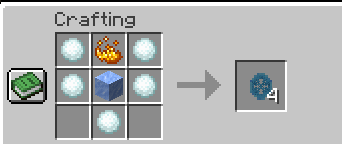
Chilled Flames
Are you tired of dealing with dangerous lava lakes in your Minecraft adventures? Chilled Flames brings you a game-changing tool to simplify lava management!
Key Features:
Frosted Absorber:
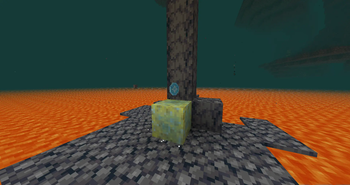
A frozen sponge with the unique ability to absorb lava instead of water. Perfect for clearing those treacherous lava pools in caves, Nether landscapes, or anywhere molten trouble lies.
Reusable Utility:
After absorbing lava, the Frosted Absorber transforms into a regular sponge, ready for crafting or future use.
Frozen Aesthetic:
The Frosted Absorber features a distinct icy design, blending seamlessly into any chilly build.
Why Choose Chilled Flames?
Clearing lava is one of the most tedious tasks in Minecraft, especially when building or exploring. Chilled Flames makes this process efficient and hassle-free while adding a cool, thematic twist to your toolbox.
How to Use:
- Equip the Frosted Absorber.
- Place it near lava to absorb the molten flow.
- Retrieve a regular sponge afterward for crafting or further use.
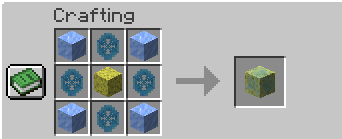
- In short, Use it like a regular sponge, but instead of heating a wet sponge, you'll need to craft it using Packed Ice, Ice Essence, and a Sponge.
Compatibility:
- Minecraft Version: 1.20.x (Recommended: 1.20.1)
- Mod Loader: Forge
Support Us on Patreon!
Support us on Patreon to unlock exclusive perks! By becoming a patron, you gain early access to mod updates, special features, and a dedicated space to engage with the development team. Patrons in the VIP tier also enjoy exclusive access to our Discord community, where you can connect with other players and share your suggestions. Your support helps us continue improving and creating exciting mods for everyone. Thank you for being a part of the journey!
- Edition: Minecraft Java
- File type: .jar
- Minecraft versions listed: 1.20, 1.20.1, 1.20.2
- How to install: Install the matching mod loader (Forge, Fabric or NeoForge) for your Minecraft version. → Download the .jar. → Put it in the .minecraft/mods folder and launch that loader profile.
- Where to get it: Opens on Modrinth — not every file is mirrored on our own servers.
Install steps are the general flow for this file type — How to install Minecraft Java mods & modpacks walks through it step by step.
- Ships as Chilled Flames 1.0-1.20.1.jar — drop this file into the mods folder
- Download size: 33 KB
- Download link checked 19 Aug 2026 — working
These come from our own check of the pack file, not from the source page.