
ModsJava
Titlecard
I don't know my version or loader
Open the Minecraft launcher and look at the profile you play on — it names both, like fabric-loader-1.21.4. The version also shows in the bottom-right corner of the game's main menu.
No loader in the profile name? Then it's plain Minecraft, and these mods won't run — you need Fabric or NeoForge installed first.


I am [Titlecard]!
Welcome to Titlecard!!
a heavily configurable mod for changing the window title of the game, allowing for the display of any text, the fps, the mod count, and more!
Extra included are format specifiers for ease of use
"%M" which just puts "Minecraft"
"%V" which gives the version of minecraft you're on
"%S" which puts your username
"%s" which shows the gamestate (playing online, lan or in singleplayer but with a - before it so it'll be "- Singleplayer")
"%d" same as above without the dash
"%I" Shows the name of the server you're connected too (the one you put in add server)
"%i" Shows the ip address + port of the server you're connected too
"%l" Shows current modcount
"%F" Shows your current FPS
Cloth config and Mod Menu recommended for easy in-game config editing/reloading
Some looks at various Titlecard configurations


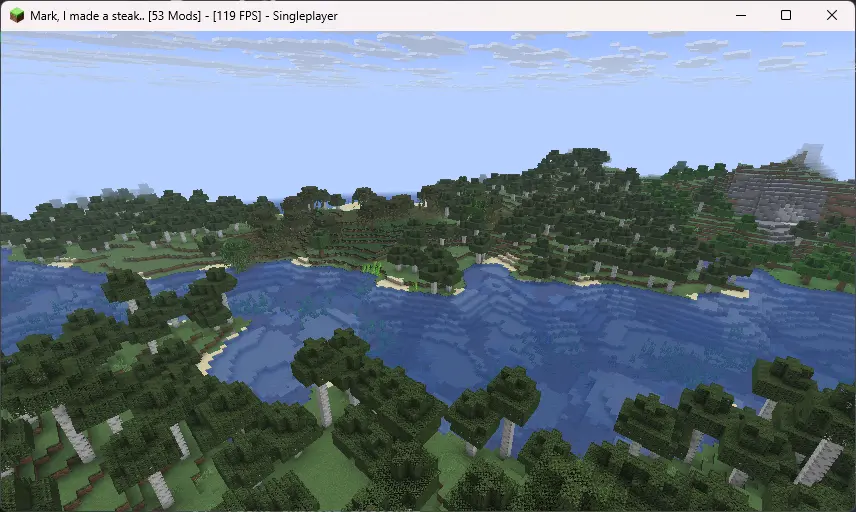
Quick facts
- Edition: Minecraft Java
- File type: .jar
- Minecraft versions listed: 1.21.6, 1.21.7, 1.21.8
- How to install: Install the matching mod loader (Forge, Fabric or NeoForge) for your Minecraft version. → Download the .jar. → Put it in the .minecraft/mods folder and launch that loader profile.
- Where to get it: Opens on Modrinth — not every file is mirrored on our own servers.
Install steps are the general flow for this file type — How to install Minecraft Java mods & modpacks walks through it step by step.
Verified by MCModsHub
- Ships as titlecard-1.0.0-1.21-6-x.jar — drop this file into the mods folder
- Download size: 123 KB
- Download link checked 10 Sept 2026 — working
These come from our own check of the pack file, not from the source page.