
ModsJava
Censorship
Java mod listed for Minecraft 1.21. Downloads from the MC Java Mods app on Android.
⬇ Download on Modrinth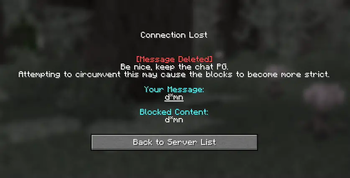
Censorship
A server-side Minecraft mod that helps maintain chat civility by filtering inappropriate language and content.
About
Censorship is primarily designed for the Distant Horizons SMP. It uses the same tested regex filters that are present on the Distant Horizons Discord server for consistent moderation and are constantly updated!
Features
- Support logging to a Discord channel via Webhooks!
- Aiming maximum mod compatibility with the message not even being recognized by the server if it's prohibited.
Configuration
After the first run, a configuration file will be generated. You can adjust the following settings:
[Settings]
  # Whether to kick the player or send them a warning message
  kickPlayer = true

  # Log messages to a Discord webhook
  discordWebhookURL = ""

  [Advanced]
    # DO NOT TOUCH | URL to fetch the regex from
    regexURL = "https://gitlab.com/distant-horizons-team/yagpdb-regex-censor/-/raw/main/discord_bot_censor_code_merge.cs"
    # Show debug logs for the regex parser
    debugMode = false
Credits
- YAGPDB Regex Censor maintained by the Distant Horizons team
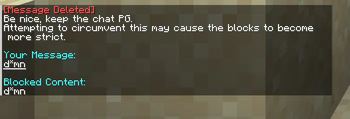
Checkout the gallery to see how the mod looks!
Quick facts
- Edition: Minecraft Java
- File type: .jar
- Minecraft version listed: 1.21.4
- How to install: Install the matching mod loader (Forge, Fabric or NeoForge) for your Minecraft version. → Download the .jar. → Put it in the .minecraft/mods folder and launch that loader profile.
- Where to get it: Opens on Modrinth — not every file is mirrored on our own servers.
Install steps are the general flow for this file type — How to install Minecraft Java mods & modpacks walks through it step by step.
File checked by MCModsHub
- Ships as Censorship.jar — drop this file into the mods folder
- Download size: 773 KB
- Download link checked 10 Nov 2026 — working
These come from our own check of the pack file, not from the source page.