
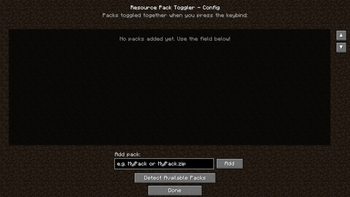
This mod lets you toggle multiple resource packs on and off with a single keypress. Perfect for players who frequently switch between different textures or want a quick way to enable a specific packs without digging through the menu.
❓ Q&A
Q: How do I configure which packs get toggled?
A: Open the Mods menu, find Resource Pack Toggler, and click the Config button. You can add packs manually or use the "Detect Available Packs" button to find them automatically.
Q: How do I toggle the packs?
A: Press F6 in-game. The key can be changed in Options → Controls → Resource Pack Toggler.
Q: Do the packs toggle one at a time or all together?
A: All configured packs toggle as a group. one press enables them all, another press disables them all.
Q: Can I add any resource pack?
A: Yes! As long as the pack is installed in your resourcepacks folder, you can add it to the toggle list.
Q: Will this work on servers?
A: Yes! Since this mod is client-side only, it works on any server, vanilla or modded, without needing to be installed on the server.
📈 Supported Versions
1.20.1 - SUPPORTED
- Edition: Minecraft Java
- File type: .jar
- Minecraft version listed: 1.20.1
- How to install: Install the matching mod loader (Forge, Fabric or NeoForge) for your Minecraft version. → Download the .jar. → Put it in the .minecraft/mods folder and launch that loader profile.
- Where to get it: Opens on Modrinth — not every file is mirrored on our own servers.
Install steps are the general flow for this file type — How to install Minecraft Java mods & modpacks walks through it step by step.
- Ships as resourcepacktoggler-1.0.1.jar — drop this file into the mods folder
- Download size: 29 KB
- Download link checked 19 Aug 2026 — working
These come from our own check of the pack file, not from the source page.