
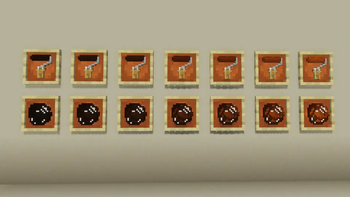


Browntone Bloom is an add-on for Happy Wall Painting, expanding your creative palette with rich, earthy brown gradients.
From the smoky hue of Charwood to the deep elegance of Mahogany Tint, this pack includes 7 natural tones designed for warm, grounded builds.
Fully compatible with the base mod's system (unlimited use rollers, cleaner, Color Palette, and Creative Catalog Scroll).
This add-on requires Happy Wall Painting v1.3.0 or later to function.
Build with warmth. Paint with character.
Special Thanks:The key visual artwork was created by ビスコ. Follow the account!: X
Subscribe to the UrotanMOD Official Guide for more updates and tutorials,
and follow me on X to see more of what’s coming!
日本語
Browntone Bloom は、Happy Wall Painting を拡張するアドオンMODです。
スモーキーな チャーウッド から、深みある マホガニーティント まで、自然なブラウングラデーション7色を追加し、温もりある建築を演出します。
本体MODのシステム(使用無制限ローラー、クリーナー、ペイントパレット、カタログスクロール)に完全対応しています。
このアドオンのご利用には Happy Wall Painting v1.3.0 以降のバージョンが必要です。
温もりで建て、味わいで彩る。
Special Thanks:キービジュアルの建築は ビスコさん です フォローはこちら!: X
アップデートやチュートリアルの情報はUrotanMOD Official Guideで、
最新の進捗はX (Twitter)で発信しています!
- Edition: Minecraft Java
- File type: .jar
- Minecraft version listed: 1.21.1
- How to install: Install the matching mod loader (Forge, Fabric or NeoForge) for your Minecraft version. → Download the .jar. → Put it in the .minecraft/mods folder and launch that loader profile.
- Where to get it: Opens on Modrinth — not every file is mirrored on our own servers.
Install steps are the general flow for this file type — How to install Minecraft Java mods & modpacks walks through it step by step.
- Ships as HappyWallPainting_Addon_BrownBloom-1.1.0.jar — drop this file into the mods folder
- Download size: 3.5 MB
- Download link checked 20 Aug 2026 — working
These come from our own check of the pack file, not from the source page.