
Pick It Up!
Java mod listed for Minecraft 1.21. Downloads from the MC Java Mods app on Android.
Pick It Up! is a smart inventory mod ⚡ that automatically picks up selected items 🎒 based on your settings. It runs entirely client-side 💻 and works on…
⬇ Download on Modrinth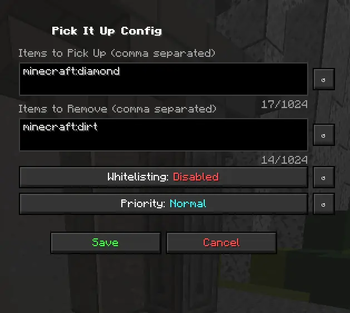
🚀 Want 25% OFF Your First Server?
Create your own Minecraft server and save 25% on your first month 🌍⚡
Perfect for playing with friends, testing mods/plugins, or starting a community server 🔥

💖 Using the link above helps support my projects!

Pick It Up! 🧲
Pick It Up! is a smart inventory automation mod ⚡ that automatically collects and organizes selected items into your inventory 🎒 based on your personal settings. It works entirely client-side 💻, meaning it functions on any server 🌐 by simulating fast, automated item pickups and swaps 🤖.
⚠️ Important:
On some servers, this mod may be bannable 🚫 because it automates item pickups and inventory swaps at high speed. Always check the server rules before using it! For example it is banned on my server: Mod list
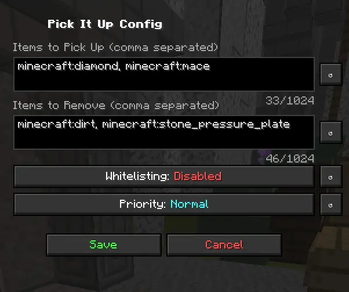
📂 Open Menu:
Press H to open the configuration menu.
Main Features: 🚀
Smart Auto Pickup 🧠: Automatically picks up only the items you want, based on customizable filters and rules.
Automatic Swapping 🔄: Replaces unwanted or low-priority items with important ones on the fly.
Inventory Optimization 🎯: Keeps your inventory clean and efficient without manual sorting.
Server Compatible 🌍: No server-side plugins required. Works by simulating legitimate player actions through optimized packets 📡.
❓ Can I use this mod in a modpack? 📦
Of course! Please feel free to include this mod in your modpacks! 💜✨
You may:
- ✅ Use this mod in public and private modpacks
- ✅ Upload modpacks containing this mod to Modrinth, CurseForge, etc.
- ✅ Use it on servers and with friends
Just please:
- ❌ Do not reupload the mod itself
- ❌ Do not claim the mod as your own
Have fun! 🌟
- Edition: Minecraft Java
- File type: .jar
- Minecraft version listed: 1.21.11
- How to install: Install the matching mod loader (Forge, Fabric or NeoForge) for your Minecraft version. → Download the .jar. → Put it in the .minecraft/mods folder and launch that loader profile.
- Where to get it: Opens on Modrinth — not every file is mirrored on our own servers.
Install steps are the general flow for this file type — How to install Minecraft Java mods & modpacks walks through it step by step.
- Ships as Pick-It-Up!-1.7.3.jar — drop this file into the mods folder
- Download size: 16 KB
- Download link checked 20 Oct 2026 — working
These come from our own check of the pack file, not from the source page.