
Winrate
Java mod listed for Minecraft 1.21. Downloads from the MC Java Mods app on Android.
⬇ Download on Modrinth
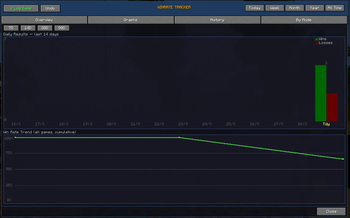
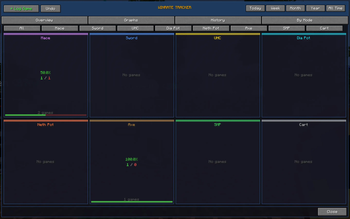

An advanced in-game tool to track your PvP performance over time.
What it does:
This mod lets you log your matches and keeps track of your stats, including:
Winrate Wins and losses Streaks Match history Performance per gamemode Basic graphs showing progress over time
You can also enter an opponent name and fetch their MCTiers rank.
What it’s for
It’s made for players who play a lot of PvP and want a clear idea of how they’re doing. Useful for improving, tracking progress, or just keeping stats.
How it works: You manually log each game through a GUI Data is saved locally in a JSON file Stats are calculated instantly MCTiers ranks are fetched through their public API (optional)
Everything is client-side.
How to use Open the winrate screen Click “Log Game” Select win or loss Pick a gamemode (Optional) enter opponent name and fetch rank Confirm
Then use the tabs to view overview, graphs, history, and stats per mode.
Notes No server required Works offline (except rank fetching) Data is stored locally
- Edition: Minecraft Java
- File type: .jar
- Minecraft version listed: 1.21.11
- How to install: Install the matching mod loader (Forge, Fabric or NeoForge) for your Minecraft version. → Download the .jar. → Put it in the .minecraft/mods folder and launch that loader profile.
- Where to get it: Opens on Modrinth — not every file is mirrored on our own servers.
Install steps are the general flow for this file type — How to install Minecraft Java mods & modpacks walks through it step by step.
- Ships as winrate.jar — drop this file into the mods folder
- Download size: 47 KB
- Download link checked 20 Oct 2026 — working
These come from our own check of the pack file, not from the source page.