
Privacy Glass & more
Java mod listed for Minecraft 1.21. Downloads from the MC Java Mods app on Android.
⬇ Download on Modrinth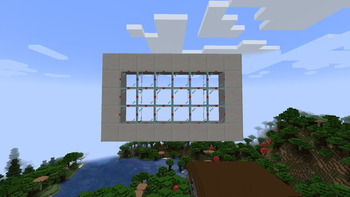
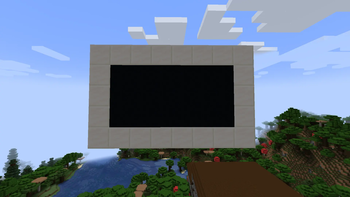
🪟 Privacy Glass – Control Transparency Like Never Before!
Bring new functionality into your Minecraft world with Privacy Glass!
This innovative mod introduces a new type of glass block that can switch between transparent and opaque states at your command. Perfect for base security, hidden rooms, or stylish architecture, the glass blends seamlessly into any build — until you decide it’s time to hide what’s behind it.
✨ Key Features
🔒 Toggle Transparency — Make your glass instantly opaque by right clicking it.
🏠 Perfect for house windows & hidden bases — Enjoy privacy at the flip of a switch!
Whether you’re designing curtains for a cabin, a secret laboratory, or a hidden bunker, Privacy Glass adds a futuristic touch and a new layer of immersion to your Minecraft world
- Edition: Minecraft Java
- File type: .jar
- Minecraft version listed: 1.21.1
- How to install: Install the matching mod loader (Forge, Fabric or NeoForge) for your Minecraft version. → Download the .jar. → Put it in the .minecraft/mods folder and launch that loader profile.
- Where to get it: Opens on Modrinth — not every file is mirrored on our own servers.
Install steps are the general flow for this file type — How to install Minecraft Java mods & modpacks walks through it step by step.
- Ships as privacy_glass-1.21.1-2.0.0.jar — drop this file into the mods folder
- Download size: 90 KB
- Download link checked 20 Oct 2026 — working
These come from our own check of the pack file, not from the source page.