
SwitchUtils
Java mod listed for Minecraft 1.20. Downloads from the MC Java Mods app on Android.
⬇ Download on Modrinth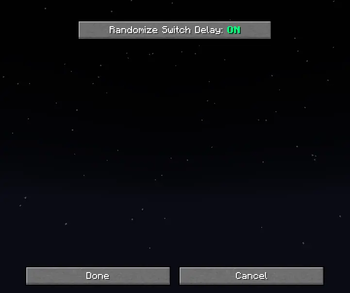
SwitchUtils
Overview
SwitchUtils is a lightweight Fabric client-side utility mod that lets you instantly swap your entire armor set with a single configurable keybind.
Whether you’re switching between combat gear, mining armor, or elytra sets & this mod makes it effortless and smooth.
Features
- Quick Armor Switching :: Press one key to automatically equip armor from your hotbar.
- Adjustable Delay :: Choose between fixed or randomized switch intervals for natural timing.
- Randomization Option :: Enable the “Randomize Switch Delay” option to make each swap feel more human-like.
- Configurable Keybind :: Change the swap key in keybind settings.
- Lightweight & Compatible :: Works on Fabric's client-side; no server installation required.
How It Works
- Place your armor pieces (helmet, chestplate, leggings, boots) in your hotbar.
- Press your Switch Key (
변경 트리거 키). - The mod automatically equips each armor piece in random order, with small configurable delays between each.
Configuration
Access the config screen under:Options(ESC) → Mods → SwitchUtils
| Option | Description |
|---|---|
| Randomize Switch Delay | Randomizes the armor switch delay for natural timing. |
| Switch Trigger Key | The keybind used to trigger armor switching. |
Requirements
- Minecraft 1.20.1
- Fabric Loader 1.16.10 or later
- Mod Menu for configuration (Optional)
Notes
This is a client-side only mod, so it’s safe to use on any server >> it only affects your local actions and visuals.
⟳ Switch smarter, not harder
- Edition: Minecraft Java
- File type: .jar
- Minecraft version listed: 1.20.1
- How to install: Install the matching mod loader (Forge, Fabric or NeoForge) for your Minecraft version. → Download the .jar. → Put it in the .minecraft/mods folder and launch that loader profile.
- Where to get it: Opens on Modrinth — not every file is mirrored on our own servers.
Install steps are the general flow for this file type — How to install Minecraft Java mods & modpacks walks through it step by step.
- Ships as SwitchUtils-1.0.0.jar — drop this file into the mods folder
- Download size: 297 KB
- Download link checked 21 Oct 2026 — working
These come from our own check of the pack file, not from the source page.