
⏱️ Item Highlighter — Highlight Important Items
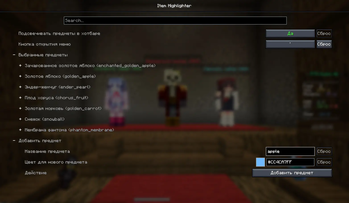
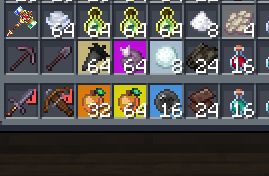
Tired of searching for key items in the middle of a fight?Item Highlighter highlights selected items with a colored overlay directly on the item icon.
It works in both hotbar and inventory, with a separate color for each tracked item.
✨ Features:
🎯 Highlights selected items in hotbar and inventory
🌈 Custom color per item
🔎 Smart item input
⚡ Autocomplete suggestions while typing
🧹 One-click item removal from the list
🎨 Color picker window + HEX color input
⌨️ Configurable keybind to open the menu
⚙️ Fully configurable via Mod Menu + Cloth Config
🎯 Why use it:
Instantly spot totems, pearls, gapples, and other important items
Great for PvP and fast-paced gameplay
Cleaner than adding extra HUD widgets
🛠️ Compatibility:
Works on Fabric
Supported Minecraft version: 1.21.4
Requires: Fabric API, Cloth Config
Optional (for config screen): Mod Menu
📌 Usage:
Open Mod Menu -> Item Highlighter -> Configure
or press your configured open-menu key
Add an item by name, pick a color, and save
Done: tracked items are highlighted instantly in hotbar and inventory
📩 For questions and bug reports: Telegram / Discord — @b1nt1n
- Edition: Minecraft Java
- File type: .jar
- Minecraft version listed: 1.21.11
- How to install: Install the matching mod loader (Forge, Fabric or NeoForge) for your Minecraft version. → Download the .jar. → Put it in the .minecraft/mods folder and launch that loader profile.
- Where to get it: Opens on Modrinth — not every file is mirrored on our own servers.
Install steps are the general flow for this file type — How to install Minecraft Java mods & modpacks walks through it step by step.
- Ships as highlighter-2.0.0.jar — drop this file into the mods folder
- Download size: 253 KB
- Download link checked 10 Sept 2026 — working
These come from our own check of the pack file, not from the source page.