
Blazin Hide Coordinates
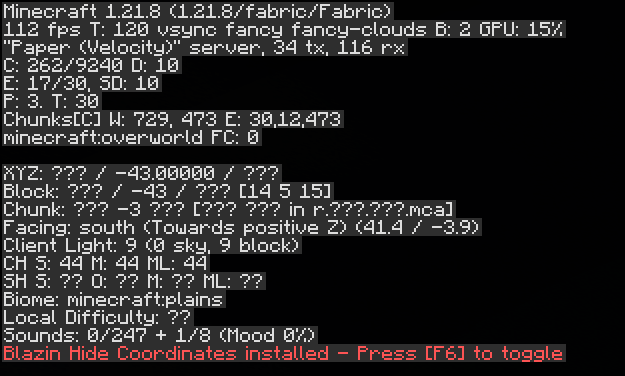
Allows you to hide the X/Z coordinates inside the Minecraft F3 Menu
Useful if you are streaming or sharing your screen and don't want others to know where you are located in the world, but still want to be able to see your Y coordinate! (You may also toggle the Y coordinate off in the YAML config file if you'd like)
Coordinates are toggled on/off by using the F6 key by default, but can be binded any other key in the Controls menu
May or may not be compatible with other F3 menu mods. Future updates may add support to these mods if there is a high enough demand. :)
- Edition: Minecraft Java
- File type: .jar
- Minecraft version listed: 1.21.8
- How to install: Install the matching mod loader (Forge, Fabric or NeoForge) for your Minecraft version. → Download the .jar. → Put it in the .minecraft/mods folder and launch that loader profile.
- Where to get it: Opens on Modrinth — not every file is mirrored on our own servers.
Install steps are the general flow for this file type — How to install Minecraft Java mods & modpacks walks through it step by step.
- Ships as Blazin-Hide-Coordinates-1.21.8-1.0.0.jar — drop this file into the mods folder
- Download size: 312 KB
- Download link checked 10 Sept 2026 — working
These come from our own check of the pack file, not from the source page.