
ModsJava
Easy Enchants/Effects
Java mod listed for Minecraft 1.21. Downloads from the MC Java Mods app on Android.
⬇ Download on Modrinth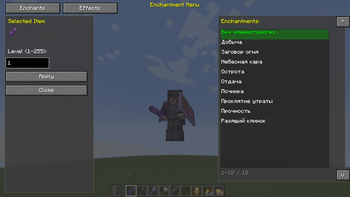
Easy Enchants/Effects - This powerful and convenient mod adds a custom menu for enchanting items and applying effects to the game. Forget about limited enchantment options - now you can apply any enchantment and effect at any level! ✨Features
🔮Enchantments Tab
Enchant any item with any available enchantment
- Level up to 255 - no limits!
- Automatic filtering - only enchantments suitable for the item in hand are shown
- Item preview - see what you're enchanting
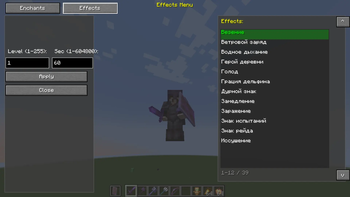
💊Effects Tab
- Apply any effect to a player
- Adjustable level (1-255)
- Adjustable duration (from 1 second to 1 week!)
- Automatic replacement - the old effect is removed before applying a new one
🎨Interface
- Semi-transparent background (67% transparency) - the game is visible through the menu
- Two tabs - quickly switch between enchantments and effects
- Smart navigation - click an element to select
- Selected highlight - green highlight of the current item
- Tooltips - hover to view the title
- List scrolling - up/down buttons for navigation
🎮 How to use
- Press V (default) to open the menu
- If you have an item in your hand, the enchantment tab will open
- If your hand is empty, the effects tab will open
- Select an item from the list by clicking the mouse
- Enter the level (and duration for effects)
- Click Apply to apply
- Click Close to close the menu
Quick facts
- Edition: Minecraft Java
- File type: .jar
- Minecraft version listed: 1.21.1
- How to install: Install the matching mod loader (Forge, Fabric or NeoForge) for your Minecraft version. → Download the .jar. → Put it in the .minecraft/mods folder and launch that loader profile.
- Where to get it: Opens on Modrinth — not every file is mirrored on our own servers.
Install steps are the general flow for this file type — How to install Minecraft Java mods & modpacks walks through it step by step.
File checked by MCModsHub
- Ships as Easy Enchants-Effects1.1.0.jar — drop this file into the mods folder
- Download size: 21 KB
- Download link checked 21 Oct 2026 — working
These come from our own check of the pack file, not from the source page.