
Description
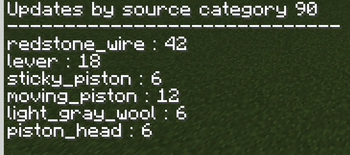
This mod lets you monitor and display every block update that occurs in your world. I recommend using it in a superflat world, as tracking all updates in a normal world can quickly become overwhelming.
Command operator /ql
status Displays which options are currently enabled. tgldisplay Turns the visual display of block updates on or off. tglmonitoring Enables or disables monitoring of block updates. All monitored updates are recorded in the log. tglhighlight Turns the highlighting of the selected ghost block on or off. show Displays all logged block updates in chat, organized by category. show {x, y, z} Displays the number of block updates that occurred at a specific coordinate in chat. clear Clears the block update log.Heads up
If you’re using shaders, some might hide or not render the block update visuals.
Quick facts
- Edition: Minecraft Java
- File type: .jar
- Minecraft version listed: 1.21.10
- How to install: Install the matching mod loader (Forge, Fabric or NeoForge) for your Minecraft version. → Download the .jar. → Put it in the .minecraft/mods folder and launch that loader profile.
- Where to get it: Opens on Modrinth — not every file is mirrored on our own servers.
Install steps are the general flow for this file type — How to install Minecraft Java mods & modpacks walks through it step by step.
Verified by MCModsHub
- Ships as queuelogmod-1.0-1.21.10.jar — drop this file into the mods folder
- Download size: 218 KB
- Download link checked 20 Aug 2026 — working
These come from our own check of the pack file, not from the source page.