
AutoCraft&Block list
This mod will allow you to craft items automatically without laying them out, as well as switch between interfaces.
⬇ Download on Modrinth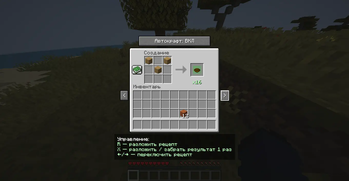
RU:
Автокрафты и переключение интерфейсов
Этот мод добавляет две ключевые функции: автоматический крафт и переключение между интерфейсами, которые делают игровой процесс более быстрым, удобным, ниже вы получите всю нужную информацию.
🔨 Автоматический крафт
Что делает?
Больше не нужно вручную расставлять предметы по ячейкам.
Мод сам размещает необходимые ресурсы в сетке крафта, если они есть в инвентаре.
Ускоряет процесс создания сложных предметов и экономит время.
🔄 Переключение между интерфейсами
Что делает?
Можно мгновенно переключаться между ближайшими рабочими интерфейсами (верстак, печь, сундук и т.д.), не закрывая интерфейса.
Упрощает взаимодействие с блоками — удобно, когда рядом несколько станций.
Повышает комфорт при игре и снижает количество лишних кликов.
✅ Особенности
Экономит время при одинаковых действиях.
Делает процесс крафта более быстрым.
Подходит как для одиночной игры, так и для серверов за неё вы бан не получите.
🔗 Социальная сеть
- Telegram - перейти
EN:
Auto crafts and interface switching
This mod adds two key features: automatic crafting and switching between interfaces, which make the gameplay faster and more convenient, below you will get all the necessary information.
🔨 Automatic crafting
What does it do?
You no longer need to manually arrange items in cells.
The mod itself places the necessary resources in the crafting grid, if they are in the inventory.
Speeds up the process of creating complex items and saves time.
Switching between interfaces
What does it do?
- You can instantly switch between the nearest work interfaces (workbench, oven, chest, etc.) without closing the interface.
*Simplifies interaction with blocks — it is convenient when there are several stations nearby.
- Increases the comfort of the game and reduces the number of unnecessary clicks.
✅ Features
Saves time with the same actions.
Makes the crafting process faster.
Suitable for both single player and server games, you will not get banned for it.
🔗 Social network
- Telegram - go to
- Edition: Minecraft Java
- File type: .jar
- Minecraft version listed: 1.21.1
- How to install: Install the matching mod loader (Forge, Fabric or NeoForge) for your Minecraft version. → Download the .jar. → Put it in the .minecraft/mods folder and launch that loader profile.
- Where to get it: Opens on Modrinth — not every file is mirrored on our own servers.
Install steps are the general flow for this file type — How to install Minecraft Java mods & modpacks walks through it step by step.
- Ships as autocraft-1.0.3.jar — drop this file into the mods folder
- Download size: 31 KB
- Download link checked 10 Sept 2026 — working
These come from our own check of the pack file, not from the source page.