
Epic Engine
This mod was originally developed for my own modpack, integrating most of the customization features needed for modpacks.
⬇ Download on Modrinth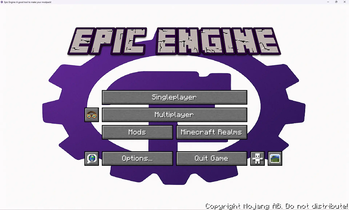

Welcome to Epic Engine (EE)!
I originally developed this mod for my own modpack, integrating most of the customization features a modpack might need. I warmly welcome its use in any non-commercial Minecraft creations.
What does it accomplish?
Modular custom features suitable for modpacks—Each module and its internal features can be individually toggled on or off.
1.Main Menu Customization(For the result, see image 1-1.)
1.Custom background image Function: Replaces the default main-menu background with a custom image.
Resource location: config/epic_engine/custom/textures/background.png (EE automatically stretches the image).
2.Custom main-menu title image Function: Replaces the game title logo with a custom image.
Resource location: config/epic_engine/custom/textures/title.png (EE automatically stretches the image).
2.Game Window Customization
1.Custom window title
Function: Changes the text in the game window’s title bar.
Default: “Epic Engine: a good tool to make your modpack!”
2.Custom window icon Function: Replaces the game window icon and task-bar icon.
Resource locations:
•Small icon (16 × 16): config/epic_engine/custom/textures/icon16.png (EE automatically stretches the image)
•Large icon (32 × 32): config/epic_engine/custom/textures/icon32.png (EE automatically stretches the image)
3.Preset Commands(For the result, see image 1-2.)
Function: Automatically executes preset commands when a player joins the server for the first time; in multiplayer, server settings override client settings.
Default: say [EPIC ENGINE]: Welcome to Epic Engine!; xp add @a 1 (use “;” to separate commands)
Planned features: Custom loading screen and loading-screen tips
- Edition: Minecraft Java
- File type: .jar
- Minecraft version listed: 1.20.1
- How to install: Install the matching mod loader (Forge, Fabric or NeoForge) for your Minecraft version. → Download the .jar. → Put it in the .minecraft/mods folder and launch that loader profile.
- Where to get it: Opens on Modrinth — not every file is mirrored on our own servers.
Install steps are the general flow for this file type — How to install Minecraft Java mods & modpacks walks through it step by step.
- Ships as epic_engine-1.0.2.jar — drop this file into the mods folder
- Download size: 5.6 MB
- Download link checked 20 Aug 2026 — working
These come from our own check of the pack file, not from the source page.