
Glomphosche
Glomphosche is a simple mod that visually ligates or compose supported character or Unicode code point sequences into supported ligatures.
Alpha Usage
This mod is currently in Alpha testing. The composition system is already working, though needing polishing and possibly improved capabilities that can be built on top with.
Characters
| Item | Pre-composed Unicode | Unifont Extension | Custom Font | Notes |
|---|---|---|---|---|
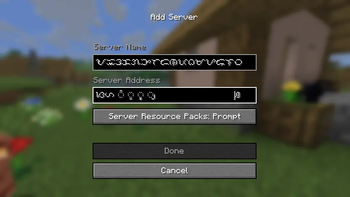
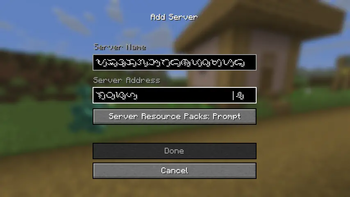
| Tagalog Block | N/A | WIP | ✅ | Since 0.1.0. To display characters with vowel markers, viramas, and pamudpod, a custom font is used. The base characters are also replaced, overriding the default from Unifont. |
| Modern Hangul Jamo | ✅ | TBD | ❌ | Since 0.2.0. Visually handles valid jamo sequence as pre-composed syllable, which the in-game Unifont supports. |
| Hanuno'o Block | N/A | WIP | ✅ | Since 0.2.1. Custom font relacement and to support displaying vowel markers and pamudpod. |
Technicals
The internals are still being polished. You can check the first few lines of
the GlomphoscheImpl class and even the mentioned Node classes there that you
may find of interest.
import io.github.startsmercury.glomphosche.impl.client.GlomphoscheImpl;
import io.github.startsmercury.glomphosche.impl.client.node.DiscreteNode;
import io.github.startsmercury.glomphosche.impl.client.node.hangul_jamo.composable.ComposableHangulJamoNode;
import net.minecraft.network.chat.FontDescription;

class Example
{

void initialize()
{
// register modern Hangul Jamo handler, or your own handler
// for a different use, if you implemented one
GlomphoscheImpl.ROOT
    .inner()
    .add(new ComposableHangulJamoNode());

// the letter 'f'
DiscreteNode node1 = GlomphoscheImpl.LOOKUP.withDiscrete('f');
// the theoretical glyph 'fi'
DiscreteNode node2 = node1.withDiscrete('i');
// register the font that retextures 'f' as the glyph representing 'fi'
node2.fontOverride(FontDescription.DEFAULT); // replace with your own

// This one is for 'ffi' by retexturing 'f'
GlomphoscheImpl.ROOT
    .withDiscrete('f')
    .withDiscrete('f')
    .withDiscrete('i')
    // replace with your own
    .fontOverride(FontDescription.DEFAULT);
}

}
The shortest path to test with an editable text box is through the Add Server
screen found in Title Screen > Multiplayer > Add Server.
- Edition: Minecraft Java
- File type: .jar
- Minecraft version listed: 1.21.10
- How to install: Install the matching mod loader (Forge, Fabric or NeoForge) for your Minecraft version. → Download the .jar. → Put it in the .minecraft/mods folder and launch that loader profile.
- Where to get it: Opens on Modrinth — not every file is mirrored on our own servers.
Install steps are the general flow for this file type — How to install Minecraft Java mods & modpacks walks through it step by step.
- Ships as glomphosche-0.2.1+mc1.21.10.jar — drop this file into the mods folder
- Download size: 159 KB
- Download link checked 10 Sept 2026 — working
These come from our own check of the pack file, not from the source page.