
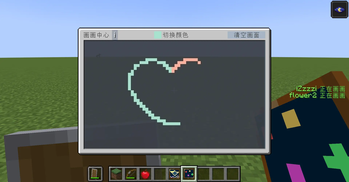
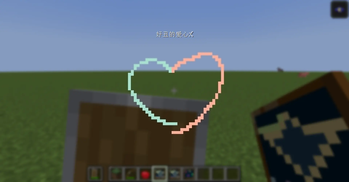
You can draw in minecraft now! In multiplayer mode, different players draw the same painting
How to use
You can press the B key to start drawing. You can also use the drawing board added in this mod to draw, and in survival mode, combine the paintings from two vanilla versions
About
- In multiplayer games, the drawing data comes from the creator, and exiting or re entering by the joiner does not affect the drawing canvas. Only when the creator exits Minecraft will the drawing data be lost
- If you need to save the drawing canvas, you can press the K key in the drawing screen, and the drawing data will be saved in the form of an item
- In addition, the mod has added some shortcut keys that can be used during the drawing, as well as some related commands. Detailed information can be viewed in the upper left corner of the drawing screen
Quick facts
- Edition: Minecraft Java
- File type: .jar
- Minecraft version listed: 1.21.1
- How to install: Install the matching mod loader (Forge, Fabric or NeoForge) for your Minecraft version. → Download the .jar. → Put it in the .minecraft/mods folder and launch that loader profile.
- Where to get it: Opens on Modrinth — not every file is mirrored on our own servers.
Install steps are the general flow for this file type — How to install Minecraft Java mods & modpacks walks through it step by step.
Verified by MCModsHub
- Ships as drawtogether-0.0.1.jar — drop this file into the mods folder
- Download size: 101 KB
- Download link checked 20 Aug 2026 — working
These come from our own check of the pack file, not from the source page.