
Good Farming
Minecraft Java mod. Downloads from the MC Java Mods app on Android.
⬇ Download on ModrinthGood Farming



Beta 1.7.3 additions and tweaks to make farming easier.
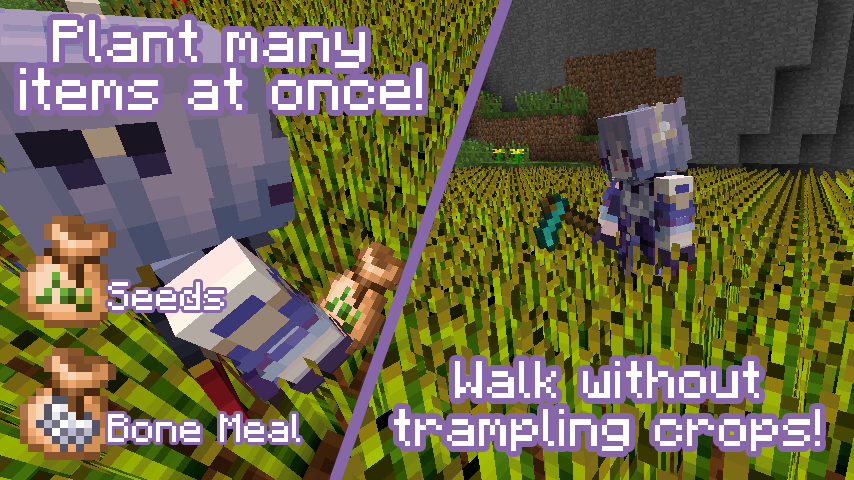
Adds a Seed Bag, which stores up to 512 Seeds or Bone Meal, and plants on farmland in a 7×5×7 area by right-clicking it on top of a block. The bag can also be used from further away than regular items (5 blocks). A Seed Bag can only hold one type of item, and cannot be emptied other than by using it. Seeds picked up will automatically go into Seed Bags in your inventory that already contain at least one seed.
Other tweaks include:
- Nerfs crop trampling, replicating the behaviour of modern versions where you need to fall from a height to trample the crops instead.
- Prevents consuming Bone Meal when used on fully grown wheat and saplings that can't grow (doesn't affect modded blocks)
- Quick replanting by right-clicking on crops if you have the seeds. Will automatically use the seeds from the harvested crop, seeds from your inventory, and seeds from Seed Bags in your inventory.
Items
Seed Bag
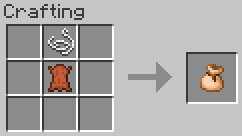
1x String + 1x Leather (shaped) → 1x Seed bag. Holds 512 seeds.
Seed Bag + Seeds
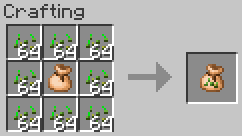
1x Seed Bag + any amount of Seeds (shapeless) to fill the Seed Bag. Up to 512 Seeds.
Seed Bag + Bone Meal
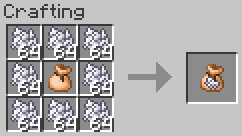
1x Seed Bag + any amount of Bone Meal (shapeless) to fill the Seed Bag. Up to 512 Bone Meal.
Compatibility
This mod has no known major compatibility issues. Functionality on modded blocks by design isn't effective without adding datapack entries; see Datapack format.
The mod adds explicit compatibility with Always More Items.
Requirements
- Minecraft Beta 1.7.3
- Babric
- StationAPI
- Fabric Language Kotlin
- Glass Config API
- Glass Networking
Recommended
- Mod Menu Babric (for in-game configuration)
Configuration
The mod's configuration can be configured in-game (if Mod Menu Babric is
installed) or in .minecraft/config/good-farming/good-farming.yml.
# If enabled, farmland is only trampled when jumping, not walking
tramplingNerfEnabled: true

# Prevents consuming Bone Meal when used on fully grown wheat
# and saplings that can't grow (doesn't affect modded blocks)
bonemealWastageFixEnabled: true

# Allow replanting crops with right-click (if you have the seeds)
quickReplantingEnabled: true

# The lateral radius, in blocks, to plant seeds with the Seed Bag
seedBagPlantLateralRadius: 3

# The vertical radius, in blocks, to plant seeds with the Seed Bag
seedBagPlantVerticalRadius: 2

# The range, in blocks, that the Seed Bag can be used from
seedBagThrowRange: 5.0

# The maximum number of seeds the Seed Bag can store
seedBagCapacity: 512

# Automatically put seeds into Seed Bags in your inventory when picked up
seedBagAutoPickupEnabled: true

# Displays the amount of seeds in the Seed Bag in the hotbar and inventory
seedBagOverlayEnabled: true
Datapack format
Seed types
The types of seeds that can be placed in a Seed Bag are provided via datapacks in the good-farming:seed_types
namespace. For example, data/good-farming/good-farming/seed_types/bone_meal.json:
{
  "item": {
    "id": "minecraft:dye",
    "damage": 15
  },
  "textureId": "good-farming:item/seed_bag_bone_meal",
  "plantOnBlocks": [
    {
      "id": "minecraft:wheat"
    },
    {
      "id": "minecraft:sapling"
    },
    {
      "tag": "good-farming:crops"
    },
    {
      "tag": "good-farming:saplings"
    }
  ]
}
- item: Object describing the item that can be placed in the Seed Bag. Seed placement will use the behaviour of
this item, or if it's a tag, the first item loaded by the game in that tag.
- id: The ID of the item. Must be specified if tag is not.
- tag: The item tag to use. Must be specified if id is not.
- damage: (optional) If id is specified, the damage value of the item to match. Leave blank or set to -1 to match all damage values.
- textureId: (optional) The resource ID of the texture to use for the Seed Bag when it contains these seeds. If a texture isn't specified, it will fall back to the empty Seed Bag texture.
- plantOnBlocks: (optional) List of blocks that seeds will attempt to be planted on. If not specified, they will
be planted on any block that the item's class can use.
- id: The ID of the block to use. Must be specified if tag is not.
- tag: The block tag to use. Must be specified if id is not.
- meta: (optional) If id is specified, the meta value of the block to match. Leave blank or set to -1 to match all meta values.
Mods can provide their own seed types by placing the corresponding JSON files in data/$modId/good-farming/seed_types.
Good Farming also provides an API for datagenning seed types with
stapi-datagen:
SeedTypeProvider.
See GoodFarmingSeedTypeProvider.kt
for an example.
Crop types
The types of seeds that can be quick-harvested by right-clicking are provided via datapacks in the
good-farming:crop_types namespace. For example, data/good-farming/good-farming/crop_types/wheat.json:
{
  "crops": [
    {
      "id": "minecraft:wheat",
      "meta": 7
    }
  ],
  "seeds": [
    {
      "id": "minecraft:wheat_seeds",
      "damage": -1
    }
  ]
}
- crops: List of blocks that can be quick-harvested by right-clicking.
- id: The ID of the block to use. Must be specified if tag is not.
- tag: The block tag to use. Must be specified if id is not.
- meta: (optional) If id is specified, the meta value of the block to match. Leave blank or set to -1 to match all meta values.
- seeds: (optional) List of items that can be replanted here when the block is quick-harvested. When the block is
broken, its drops will be searched for one of these items, and then that item will be replanted in the same spot. If
it isn't found, then the player's hand, hotbar, and inventory are searched for matching seeds or a matching Seed Bag
containing the seeds; whichever is found first.
- id: The ID of the item. Must be specified if tag is not.
- tag: The item tag to use. Must be specified if id is not.
- damage: (optional) If id is specified, the damage value of the item to match. Leave blank or set to -1 to match all damage values.
Mods can provide their own crop types by placing the corresponding JSON files in data/$modId/good-farming/crop_types.
Good Farming also provides an API for datagenning crop types with
stapi-datagen:
CropTypeProvider.
See GoodFarmingCropTypeProvider.kt
for an example.
Datapacks in StationAPI
Note that StationAPI currently doesn't support loading datapacks outside of mods. If you as a player or server admin would like to modify the built-in seed types, you can do this by wrapping your datapack in a mod:
- Create a folder for your datapack, e.g.
example-pack. - Place your JSON files in
example-pack/data/example-pack/good-farming/seed_typesorexample-pack/data/example-pack/good-farming/crop_types. - Place a
fabric.mod.json(spec) file in the root with the following contents:
Note that{ "schemaVersion": 1, "id": "example-pack", "version": "1.0.0", "name": "Example Pack for Good Farming", "description": "Your own changes to Good Farming's data here!" }nameanddescriptionare technically optional, but Mod Menu will crash if they're not set. - Zip the contents of the datapack's folder. i.e. the root of the zip should contain
fabric.mod.jsonanddata. - Rename the zip to
.jar, e.g.example-pack.jar. - Place the jar in your
modsfolder, e.g..minecraft/mods/example-pack.jar. - Restart the game.
License
This mod is licensed under the MIT license.
- Edition: Minecraft Java
- File type: .jar
- Minecraft version listed: b1.7.3
- How to install: Install the matching mod loader (Forge, Fabric or NeoForge) for your Minecraft version. → Download the .jar. → Put it in the .minecraft/mods folder and launch that loader profile.
- Where to get it: Opens on Modrinth — not every file is mirrored on our own servers.
Install steps are the general flow for this file type — How to install Minecraft Java mods & modpacks walks through it step by step.
- Ships as good-farming-1.1.1.jar — drop this file into the mods folder
- Download size: 204 KB
- Download link checked 21 Oct 2026 — working
These come from our own check of the pack file, not from the source page.