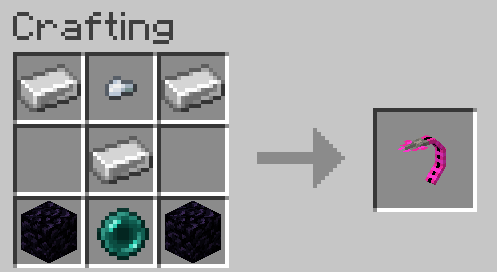
Adds Alter's tail as a craftable item to allow you to create void passages through blocks.
Usage
While holding Alter's tail in your main or off hand, aim at a block face and right click to create a portal in the direction of the targeted face. If a portal is facing downwards it will create a void string up to 10 blocks below the portal. Right click the string to teleport up the portal.
Placing Conditions
Certain blocks will not allow void passages to be created on them or the side of the block they are attached to. This includes plants, liquids, and generally blocks smaller than a slab with some exceptions such as carpets, fences, doors, etc. Grasses will get replaced by the passages and strings but other blocks that are considered invalid starts will add to the placement distance check. Bedrock, barrier blocks, and end portals and frames will prevent the placing of passages entirely.
- Edition: Minecraft Java
- File type: .jar
- Minecraft version listed: 1.21
- How to install: Install the matching mod loader (Forge, Fabric or NeoForge) for your Minecraft version. → Download the .jar. → Put it in the .minecraft/mods folder and launch that loader profile.
- Where to get it: Opens on Modrinth — not every file is mirrored on our own servers.
Install steps are the general flow for this file type — How to install Minecraft Java mods & modpacks walks through it step by step.
- Ships as alteredportals-1.0-1.21.jar — drop this file into the mods folder
- Download size: 113 KB
- Download link checked 10 Sept 2026 — working
These come from our own check of the pack file, not from the source page.