
ModsJava
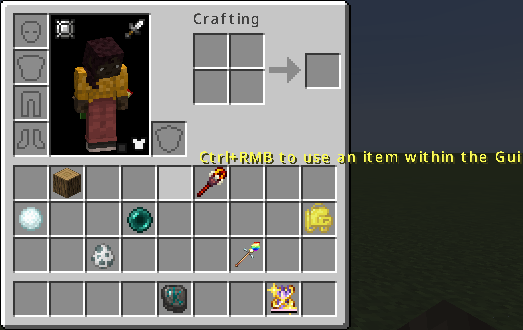
Use Item Within Gui
Java mod listed for Minecraft 1.21. Downloads from the MC Java Mods app on Android.
⬇ Download on ModrinthIn a multiplayer environment, there is no need to install it on the Server side
- Ctrl+RMB on a slot allows you to use the item from within the Gui (you can also operate levers or open chests)
- +Shift to use as if you were sneaking
- +Alt to place used items in your hand (for backpack items and the like)
- Ctrl+RMB on non-slot areas performs the standard RMB action while the Gui is open (this means using the item in your main hand. Even if you have nothing equipped, you can interact with blocks)
You can configure several settings in config/useitemwithingui-client.toml Show operation hints on the Gui
showHint = true
Press Ctrl+RMB outside the Gui to use the item in your hand
pressOutsideToUse = true
Quick facts
- Edition: Minecraft Java
- File type: .jar
- Minecraft version listed: 1.21.1
- How to install: Install the matching mod loader (Forge, Fabric or NeoForge) for your Minecraft version. → Download the .jar. → Put it in the .minecraft/mods folder and launch that loader profile.
- Where to get it: Opens on Modrinth — not every file is mirrored on our own servers.
Install steps are the general flow for this file type — How to install Minecraft Java mods & modpacks walks through it step by step.
File checked by MCModsHub
- Ships as UIWG-1211.1.0.jar — drop this file into the mods folder
- Download size: 12 KB
- Download link checked 11 Nov 2026 — working
These come from our own check of the pack file, not from the source page.