
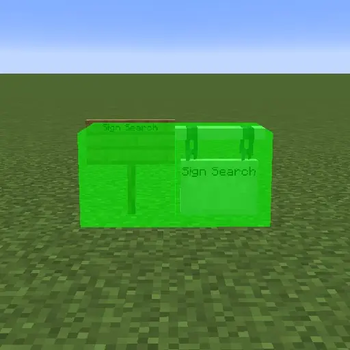
Simple to use Sign Search mod
SignSearch is a lightweight, client-side Fabric mod that lets you search for signs in the world by text. Making searching for specific signs faster and more efficient.
Simply type /signsearch in chat, and any loaded signs containing your search term will be highlighted with a neon green glow.
Features:
🔍 Search signs by text
💚 Green highlight overlay
✅ 100% client-sided
Commands:
/signsearch <text>
— highlight all signs containing the searched-for text (not case or space sensitive)
/signsearch (without text)
— clear the current search, removing the glow effect from signs
- Edition: Minecraft Java
- File type: .jar
- Minecraft version listed: 1.21.11
- How to install: Install the matching mod loader (Forge, Fabric or NeoForge) for your Minecraft version. → Download the .jar. → Put it in the .minecraft/mods folder and launch that loader profile.
- Where to get it: Opens on Modrinth — not every file is mirrored on our own servers.
Install steps are the general flow for this file type — How to install Minecraft Java mods & modpacks walks through it step by step.
- Ships as signsearch-1.0-mc1.21.11.jar — drop this file into the mods folder
- Download size: 21 KB
- Download link checked 20 Aug 2026 — working
These come from our own check of the pack file, not from the source page.