
nbtmapper
This mod is intended for map art building and creative projects. Use on multiplayer servers only if permitted by the server rules.
⬇ Download on Modrinth
NbtMapper - Automatic Map Art Builder
Disclaimer: This mod is intended for map art building and creative projects. Use on multiplayer servers only if permitted by the server rules.
A Fabric client-side mod that helps you build map art from NBT structure files. Load your structure, set the coordinates, and the mod assists with movement, inventory management, block placement, and resupply.
Requirements
- Minecraft 1.21.11
- Fabric Loader 0.18.2+
- Fabric API
- Java 21+
- A server with teleport commands (e.g.,
/home,/warp) for auto-resupply
Installation
- Install Fabric Loader for Minecraft 1.21.11
- Download and place the mod
.jarinto yourmods/folder - Make sure Fabric API is also in the
mods/folder - Launch the game
Quick Start
- Place your
.nbtstructure files into<game_dir>/nbtmapper/ - In-game, press Z to open the GUI
- Go to the Tasks tab, click an NBT file to load it
- On the Main tab, click New Site to set the build origin (auto-snaps to 128-block map grid)
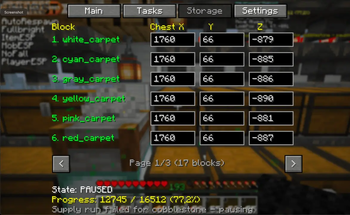
- Configure your storage chests in the Storage tab (chest coordinates for each block type)
- Set your teleport commands in the Settings tab
- Click Start — the mod handles the rest
Features
Fully Automated Building
- Loads NBT structures and places blocks in an optimized snake pattern
- Automatically places cobblestone bases before carpet/surface blocks
- Prefills nearby same-type blocks while in range for extra speed
- Skips already-correct blocks instantly
Auto Resupply
- Detects when inventory is low on a block type
- Uses server teleport commands (e.g.,
/home,/warp) to travel to your configured storage area - Batch supply: fetches multiple block types in a single trip
- Consolidates split stacks in inventory after fetching
Auto-Next Map
- When a map completes, automatically loads the next NBT file (alphabetical order)
- Offsets the build origin along X axis by the previous map's width
- Perfect for building multi-map art pieces side by side
- Toggle on/off via the Auto button on the Main tab
Session Persistence
- Progress is auto-saved every 10 seconds
- Remembers last loaded file, origin, settings, and running state
- Resumes automatically after game restart if building was active
Safety Features
- Loop detection: auto-pauses if stuck in a loop, resumes after 20 seconds
- Block verification: checks previously placed blocks to ensure correctness
- Stuck detection: repositions the player if they get stuck during building
- Max retry limits on movement and placement attempts
- Automatic error recovery during movement
GUI Overview
Press Z to open. The GUI has 4 tabs:
Main Tab
- Build origin coordinates (read-only, set via New Site)
- Large Start/Pause button
- Progress display with manual set/reset
- Auto toggle (auto-load next map on completion)
- Debug toggle (shows real-time HUD overlay)
Tasks Tab
- Lists all
.nbtfiles in thenbtmapper/folder - Click to load, X to delete
- Shows progress count and
[done]marker for completed maps - Open NBT Folder button for quick access
Storage Tab
- Maps each block type to a chest location (X/Y/Z)
- Edit coordinates directly in the GUI
- Auto-saves on change
Settings Tab
- TP to Store: command to teleport to your storage area
- TP to Worksite: command to return to the build site
- Update Home: command to update your home position before supply runs
- Move Mode: Walk / Sprint / Creative Fly / Always Fly / Elytra
Configuration Files
All config files are stored in <game_dir>/nbtmapper/:
| File | Purpose |
|---|---|
storage.json |
Block-to-chest coordinate mappings and teleport commands |
settings.json |
Origin, move mode, auto-next, last loaded file, running state |
<name>_progress.json |
Per-map build progress |
Movement Modes
| Mode | Description |
|---|---|
| Walk | Standard ground movement |
| Sprint | Sprinting ground movement |
| Creative Fly | Creative mode flight, disables on arrival |
| Always Fly | Creative mode flight, stays enabled |
| Elytra | Elytra-based flight |
How It Works
The mod runs a state machine on each client tick:
NEXT → EQUIPPING → MOVING → PLACING → NEXT → ...
                                ↘ SUPPLYING (when low on blocks)
- NEXT: Finds the next block to place, skips air/completed blocks in bulk
- EQUIPPING: Switches hotbar to the correct block
- MOVING: Navigates to within 4 blocks of the target
- PLACING: Places the block and prefills nearby same-type blocks
- SUPPLYING: Teleports to storage, fetches blocks, returns
Multiple states can chain in a single tick for efficient building.
NBT File Format
The mod reads standard Minecraft structure NBT files (.nbt). These can be created with:
- Structure blocks in-game
- External tools like NBT Studio or Amulet Editor
- Map art generators that export to NBT format
- Recommended: Online map art generators such as MapartCraft can convert images to NBT files
The mod reads the palette (block types) and blocks (positions), keeping only the topmost block per X/Z column.
Important Notes
- Client-side only: This mod runs entirely on the client. No server-side installation needed.
- Server rules: Always ensure your server permits building assistance tools before use.
- Teleport commands: The resupply system relies on server-provided teleport commands (e.g., Essentials
/home,/warp). Configure these in the Settings tab. - Creative fly: The default move mode requires creative flight ability. Switch to Walk/Sprint if playing in survival without fly permissions.
- Backup: The mod places blocks in the world. Always have backups of important builds.
- First run: On first launch,
storage.jsonis created with default chest coordinates that won't match your server. You must configure your own chest locations in the Storage tab.
Keybindings
| Key | Action |
|---|---|
| Z | Open/close GUI (auto-pauses when opening) |
- Edition: Minecraft Java
- File type: .jar
- Minecraft version listed: 1.21.11
- How to install: Install the matching mod loader (Forge, Fabric or NeoForge) for your Minecraft version. → Download the .jar. → Put it in the .minecraft/mods folder and launch that loader profile.
- Where to get it: Opens on Modrinth — not every file is mirrored on our own servers.
Install steps are the general flow for this file type — How to install Minecraft Java mods & modpacks walks through it step by step.
- Ships as nbtmapper-1.0.0.jar — drop this file into the mods folder
- Download size: 86 KB
- Download link checked 10 Sept 2026 — working
These come from our own check of the pack file, not from the source page.