
ModsJava
Refilling Boxes
Adds boxes that can automatically put in or take out items to keep a certain amount of items in your inventory.
⬇ Download on Modrinth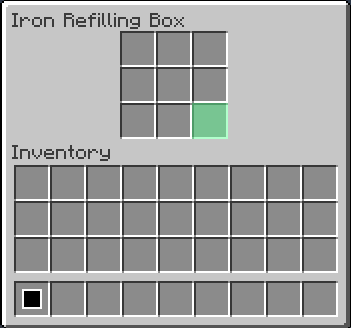
For Create version, check Create: Refilling Boxes!
Refilling Boxes
Adds boxes that can automatically put in or take out items to keep a certain amount of items in your inventory.
Items
- Iron Refilling Box: 9 slots, transfers 5 items per second
- Diamond Refilling Box: 27 slots, transfers 10 items per second
- Netherite Refilling Box: 54 slots, transfers 20 items per second
How to Use
- Open the Box's GUI by right-clicking.
- Put an item into the green slot at bottom-right of the Box's GUI as a target item.
- If you have less than 32 of the target items, the Box will put them into your inventory.
- If you have more than 32 of the target items, the Box will take them from your inventory.
Refilling Boxes are useful when...
- You use a bow or a gun (set arrows or ammo as a target)
- You go mining (set cobblestones or minerals as a target)
- etc...
Quick facts
- Edition: Minecraft Java
- File type: .jar
- Minecraft version listed: 1.20.1
- How to install: Install the matching mod loader (Forge, Fabric or NeoForge) for your Minecraft version. → Download the .jar. → Put it in the .minecraft/mods folder and launch that loader profile.
- Where to get it: Opens on Modrinth — not every file is mirrored on our own servers.
Install steps are the general flow for this file type — How to install Minecraft Java mods & modpacks walks through it step by step.
Verified by MCModsHub
- Ships as refilling_boxes-1.0.0-forge-1.20.1.jar — drop this file into the mods folder
- Download size: 166 KB
- Download link checked 20 Aug 2026 — working
These come from our own check of the pack file, not from the source page.