
Simple Counter for Fabric 1.21.x
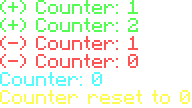
A simple and easy to use counter for Minecraft! Numbers go up and down by 1, with deafult keybinds being PageUp to add, and PageDown to subtract. View counter by /cs or /counter show
SimpleCounter By ilovelifethankyou on Discord
Requires Fabric API
Commands
/counter show- Shows counter/counter reset- Resets counter/cs- Show counter shortcut
Customizable Keybinds
Add- Adds number - DefaultPGUPSubtract- Removes number - DefaultPGDN
Coming Soon:
Counter preset -
Starting the counter at a number, negative numbers too
/counter set <#>- Preset counter
Multiple counters/counter loading -
For saving counters between game sessions
/counter create <name>/counter save <name>- for saving an unnamed list/counter load <counter>/counter list- Lists counter names and numbers- Message should show (+/-) Counter: <#>
Help command -
For help with all these commands
/counter help- Help command
Quick facts
- Edition: Minecraft Java
- File type: .jar
- Minecraft versions listed: 1.21, 1.21.1, 1.21.2
- How to install: Install the matching mod loader (Forge, Fabric or NeoForge) for your Minecraft version. → Download the .jar. → Put it in the .minecraft/mods folder and launch that loader profile.
- Where to get it: Opens on Modrinth — not every file is mirrored on our own servers.
Install steps are the general flow for this file type — How to install Minecraft Java mods & modpacks walks through it step by step.
Verified by MCModsHub
- Ships as simplecounter-1.0.0.jar — drop this file into the mods folder
- Download size: 1.1 MB
- Download link checked 11 Sept 2026 — working
These come from our own check of the pack file, not from the source page.