
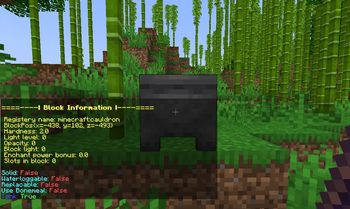
Block Information is a simple mod that lets you see detailed information about any block just by right-clicking it with a Block Information Stick.
It shows useful details like block name, hardness, light level, opacity, and more — making it easy to learn about blocks without needing external tools or commands.
Perfect for builders, modpack makers, or anyone curious about the world of Minecraft!
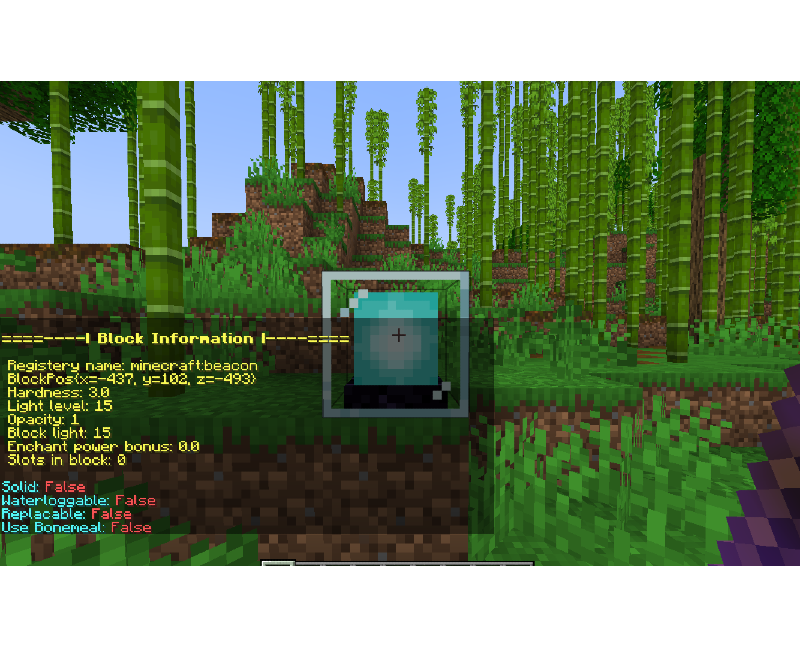
Explanation of variables:
Registry name: The registered Minecraft ID of the block.
BlockPos: The block’s position in the world (X, Y, Z).
Hardness: How long the block takes to break.
Light level: The amount of light the block emits (0–15).
Opacity: How much light the block blocks (higher = less transparent).
Block light: Light level at the block’s location.
Enchant power bonus: Extra enchanting power provided by the block (like bookshelves).
Slots in block: How many inventory slots the block has.
True/False:
Solid: Whether the block is solid.
Waterloggable: Can the block be waterlogged?
Replaceable: Can this block be replaced by other blocks when placed?
Use Bonemeal: If the block reacts to bonemeal use.
Extra flags:
Energy: The amount of energy in block.
Energy Capacity: How much energy can be stored.
Extract Energy: If the block extracts energy. (True/False)
Receive Energy: If the block receives energy. (True/False)
Tank: If the block can store fluid. (True/False)
- Edition: Minecraft Java
- File type: .jar
- Minecraft version listed: 1.21.1
- How to install: Install the matching mod loader (Forge, Fabric or NeoForge) for your Minecraft version. → Download the .jar. → Put it in the .minecraft/mods folder and launch that loader profile.
- Where to get it: Opens on Modrinth — not every file is mirrored on our own servers.
Install steps are the general flow for this file type — How to install Minecraft Java mods & modpacks walks through it step by step.
- Ships as blockinformation-1.0.0-neoforge-1.21.1.jar — drop this file into the mods folder
- Download size: 23 KB
- Download link checked 20 Aug 2026 — working
These come from our own check of the pack file, not from the source page.